
Google Search Console already knows about your broken links. It just didn't tell you until after Googlebot crawled them, flagged them, and possibly demoted your rankings.
That's the fundamental problem with relying on Google Search Console to find broken links and check for dead link issues: it's a forensics tool, not a prevention tool. By the time a 404 appears in the Coverage report, your crawl budget has been wasted, your link equity may have leaked, and your users may have already bounced from dead pages. The data is accurate—but you're reading yesterday's news.
This guide walks through exactly how to use GSC to find and prioritize every broken link on your site. Then we'll cover the gap GSC can't fill: catching broken links before Google does.
What Google Search Console Tells You About Broken Links
Google Search Console surfaces broken link data in two primary places: the Coverage report (now called the Indexing report in newer GSC interfaces) and the URL Inspection tool. Each gives you a different angle on the same underlying problem.
The Coverage report shows you aggregate data—how many pages Google tried to crawl and what it found. The URL Inspection tool lets you drill into any individual URL to see the last crawl date, the response Googlebot received, and how Google currently understands that page.
Between the two, you get a surprisingly complete picture of your site's broken link problem. What you don't get is a real-time feed or advance warning.
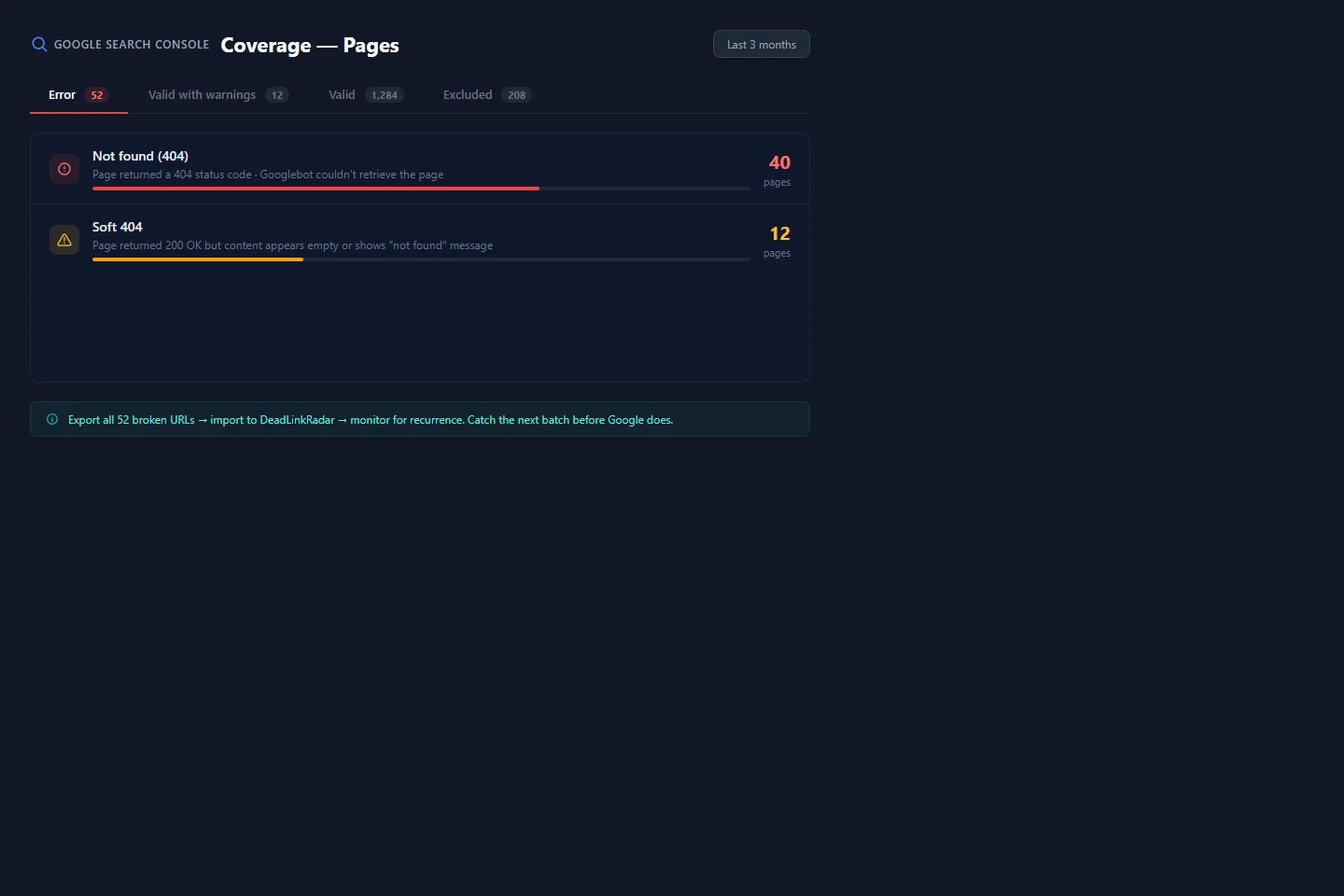
Stylized GSC Coverage report showing error categories (click to view full size)
The Two Broken Link Categories in GSC
When reviewing the Coverage report, two error types matter most for broken link detection:
"Not found (404)" — These are hard 404s. Your server returned a 404 status code. GSC knows the page doesn't exist. These are the easiest broken links to find and fix.
"Soft 404" — These are more insidious. Your server returned a 200 OK status code, but Googlebot analyzed the page content and determined the page is effectively empty or shows an error message. A product page that says "This item has been discontinued" while returning 200 is a soft 404 in Google's eyes. Basic link checkers miss these entirely.
Both categories damage your crawl budget and signal poor site health to Google's quality systems.
Step 1: Find 404 Errors in the Coverage Report
Open Google Search Console and navigate to Indexing → Pages (formerly Coverage). You'll see a summary graph and four category tabs: Error, Valid with warnings, Valid, and Excluded.
Click Error to filter to broken pages only. You'll see a list of error types—look for "Not found (404)" and click it. This expands a list of every URL Googlebot tried to crawl and received a 404 response on.
A few things to check immediately:
Look at the count. Five 404s is a minor housekeeping issue. Five hundred is a structural problem, often from a site migration with incomplete redirects.
Check "Discovered — currently not indexed." This column tells you how Google first found the URL. If most of your 404s come from sitemaps, that's a sitemap hygiene problem. If they come from internal links, you have broken internal links to clean up.
Export the data. GSC lets you export the full URL list as a CSV. Do this. You'll need it for the prioritization step.
Reading the Date Columns
GSC shows you when Googlebot last crawled each broken URL. Pay attention to two date patterns:
- Recently crawled 404s — Googlebot found this recently. It's actively consuming crawl budget right now. High priority.
- Crawled months ago — These might already be settled in Google's view. Still worth fixing, but lower urgency.
Step 2: Identify Soft 404s in GSC
Soft 404s are in the same Coverage report, but they're in the "Valid with warnings" tab, not the Error tab. Look for entries labeled "Indexed, though blocked by robots.txt" or find "Soft 404" in the Error tab—GSC's classification has varied across interface updates.
The reason soft 404s deserve separate attention: they're harder to diagnose because your server thinks the page is fine. Your web team thinks the page is fine. Your basic monitoring tools think the page is fine. Only Google (and tools with content analysis) can see the problem.
Common causes of soft 404s that GSC will flag:
- Discontinued product pages that show "No longer available" with 200 status
- Deleted blog posts where the CMS shows "Post not found" instead of returning 404
- Empty category pages with zero products after a catalog cleanup
- Search result pages where the query yields no results (the page loads but has no content)
When you find soft 404s in GSC, treat them with the same urgency as hard 404s—Google does.
Step 3: URL Inspection for Individual Diagnosis
The Coverage report tells you what's broken. URL Inspection tells you why.
For any URL flagged as a 404 or soft 404, copy it and paste it into the URL Inspection bar at the top of GSC. You'll get a detailed breakdown:
Coverage status — The current indexing status and the specific reason for any issue.
Last crawl date — When Googlebot last visited this URL. If it was crawled recently and returned 404, that budget is already spent.
Crawled as — Whether Googlebot fetched this as desktop or mobile. Since Google moved to mobile-first indexing, discrepancies here matter.
Request live test — This is the most useful feature. Click "Test Live URL" and GSC will fetch the page right now and show you the current response. This tells you whether the issue is still active or already fixed.
Use URL Inspection to verify your fixes before removing URLs from a monitoring list. A page that looks fixed in your browser might still serve 404 to Googlebot if caching, redirects, or bot-specific behavior is involved.
Step 4: Export and Prioritize Your Broken Link List
After running the Coverage report and flagging soft 404s, you should have a CSV export of every broken URL Google has found. Now you need to prioritize—not all broken links deserve equal attention.
Prioritization Framework
Open the exported CSV and cross-reference it against your analytics data. Sort your broken links into three tiers:
Tier 1 — Fix immediately:
- Pages with impressions or clicks in the last 90 days (check GSC Search Results for historical data)
- URLs that appear in your XML sitemap
- Pages you know have external backlinks pointing to them
Tier 2 — Fix within the week:
- Internal links from high-traffic pages pointing to 404s
- Product or category pages central to your site structure
- Soft 404s from main content areas (not pagination or filters)
Tier 3 — Fix when convenient:
- Old campaign landing pages with zero traffic
- Paginated pages from content series that no longer exist
- URLs from previous domain structures with no incoming links
How to Find Clicks Data for Broken URLs
GSC doesn't directly show you which broken URLs had traffic—you need to cross-reference. In the Search Results report, switch the filter to show all pages, then compare with your 404 list. Any broken URL that appears in both lists has active search traffic hitting a dead end. These are your highest-priority fixes.
What Google Search Console Doesn't Show You
Here's where GSC's limitations become critical—especially if you're using it as your only way to find broken links and check for dead link problems across your site.
GSC Only Shows Past Crawls
GSC reports what Googlebot found the last time it crawled your pages. Googlebot crawls on its own schedule, which might be daily for high-authority pages or monthly for lower-priority content. A link that broke yesterday won't appear in GSC until after Googlebot's next visit—which could be weeks away.
During that gap, users follow the broken link and hit a dead end. A dead link checker running in real time would catch this immediately; GSC can't. Googlebot hasn't flagged it yet, so your monitoring shows nothing. The damage accumulates invisibly.
This is why using GSC to find broken links tells only half the story: it shows you the links that are already broken and already costing you, not the ones that will break tomorrow.
GSC Doesn't Monitor External Links Pointing to Your 404s
If another site links to a page on your site that no longer exists, GSC will eventually flag the 404 when Googlebot crawls your site. But GSC doesn't tell you which external sites are linking to your 404s—that's what tools like Ahrefs or Google Search Console's Links report (which shows referring domains) can help with.
For the reverse problem—links from your site pointing to dead external pages—GSC provides no visibility at all. If you link out to a resource that disappears tomorrow, you won't know until you manually check.
GSC Can't Predict Future Breakage
Sites you link to restructure their content, delete old posts, take down product pages, or occasionally shut down entirely. None of this triggers an alert in GSC. The link works today; it might be dead next month. You'll find out when Googlebot does.
A broken link checker tool that monitors continuously doesn't have this limitation—it checks for dead links on your schedule, not Google's. This gap—between when a link breaks and when GSC reports it—is exactly what automated monitoring addresses.
How to Find Broken Links Automatically Before Google Does
Automated link monitoring fills the gap GSC can't cover: real-time detection of broken links before Google finds them. A purpose-built dead link checker continuously verifies every URL you care about, so you find broken links on your terms—not when Googlebot gets around to it.
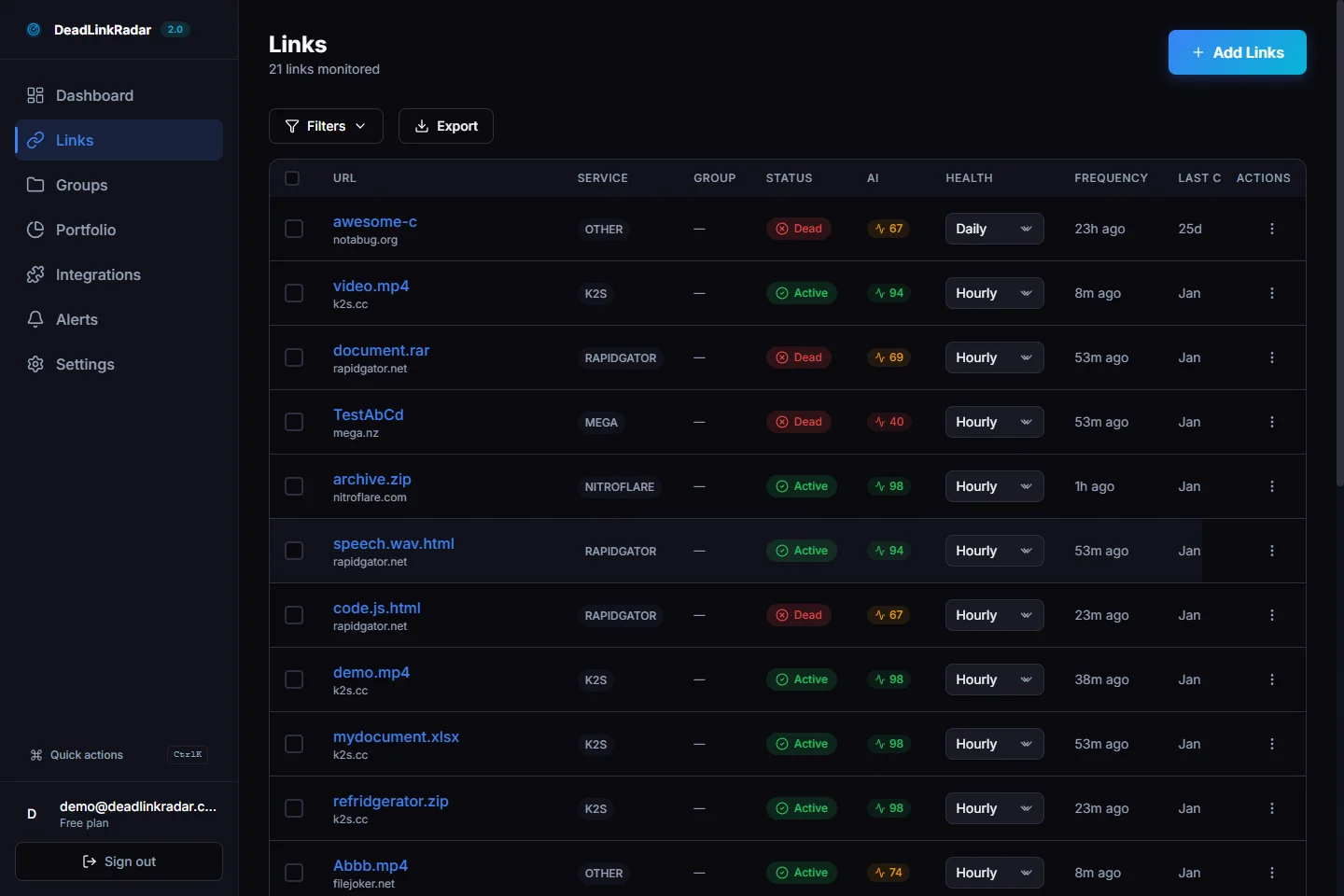
DeadLinkRadar links dashboard showing live link health status (click to view full size)
Importing Your Links From GSC
Your GSC CSV export is a perfect starting point for DeadLinkRadar. The broken URLs in that export are confirmed problem areas—import them immediately to check for dead link recurrence and catch any future re-breakage. Think of it as converting GSC's historical broken link data into a proactive monitoring list.
Beyond the broken URLs, import the links you most want to protect:
- Your highest-traffic pages and the links they contain
- URLs listed in your XML sitemap
- External resources you cite frequently in your content
- Links on your most-linked pages (your "link equity hubs")
Configuring Check Frequency
Not every link needs to be checked every 15 minutes. Use tiered monitoring to match check frequency with link importance:
Critical links (every 15 minutes): Affiliate links, product pages with active campaigns, links on your homepage and top landing pages
Standard links (daily): Blog post outbound links, documentation references, internal navigation
Low-priority links (weekly): Archive content, older posts, supplementary resources
DeadLinkRadar lets you configure check frequency per link or per group, so you can protect your most important links without burning through check limits on static content.
Setting Up Alerts
The monitoring is only as good as the alerting. Configure notifications so you know the moment a link changes status:
Email alerts for immediate notification when a link goes dead. Set up direct-to-inbox for critical links, and daily digest for standard-priority links.
Slack or Discord alerts for team visibility. When your content team publishes a post, the whole team should know if a link in that post breaks within the first 24 hours.
Webhook alerts to integrate with your publishing workflow. If you run an automated QA process, webhook triggers let you programmatically respond to broken links.
Viewing Link Status History
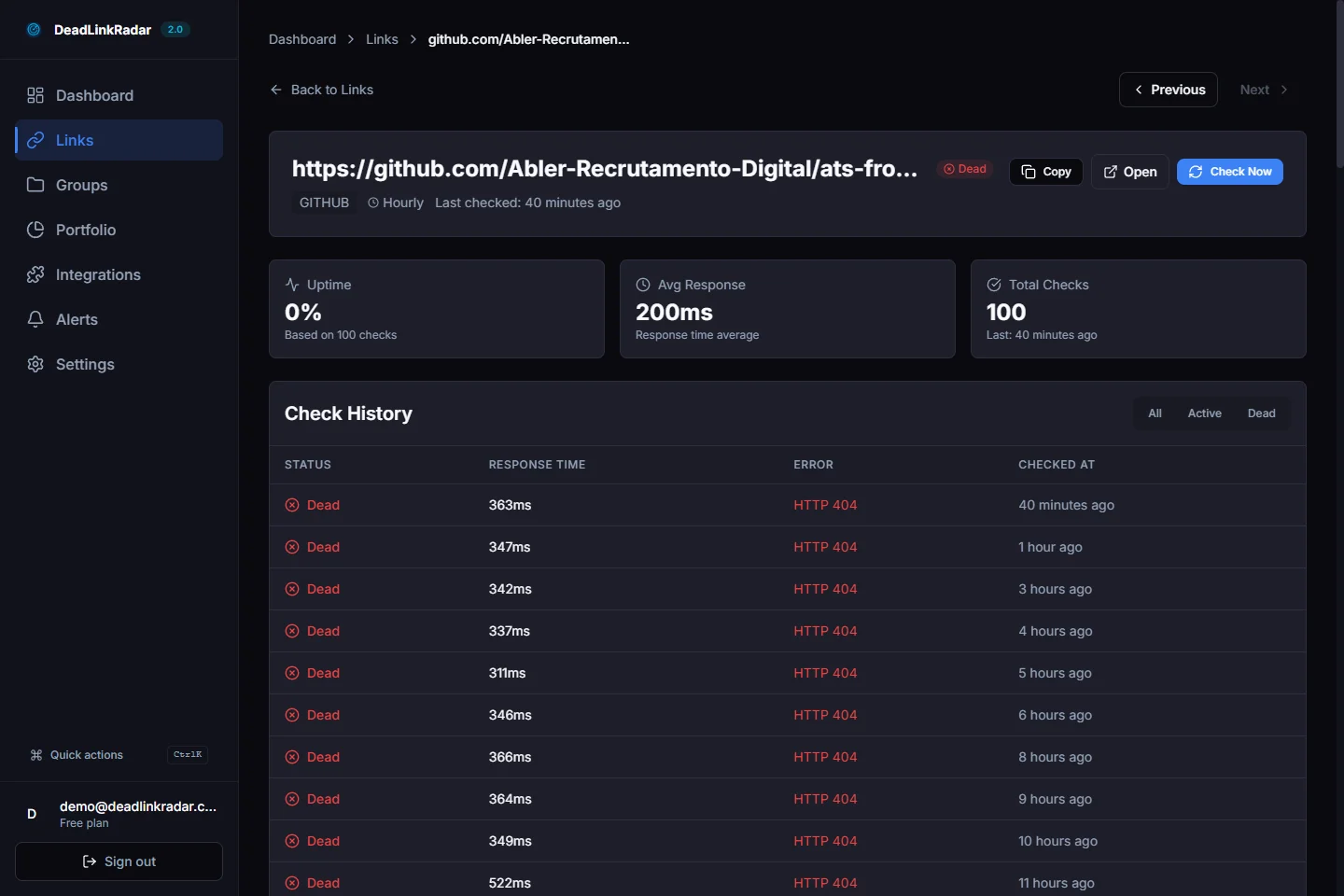
Link status history view showing when a link transitioned to broken (click to view full size)
Every link in DeadLinkRadar has a status history that shows when it was last checked, what it returned, and how the status has changed over time. This timeline data is useful when investigating why a page's bounce rate spiked—you can cross-reference link status history with traffic anomalies.
GSC + DeadLinkRadar: A Combined Workflow
These tools solve different problems. Used together, they give you complete broken link coverage.
| Task | Use GSC | Use DeadLinkRadar |
|---|---|---|
| Discover historical 404s Google found | ✅ | — |
| Identify soft 404 patterns | ✅ | ✅ (content analysis) |
| Verify individual URL status | ✅ (URL Inspection) | ✅ (on-demand check) |
| Monitor links in real time | ❌ | ✅ |
| Alert when a link breaks | ❌ | ✅ |
| Check external links from your pages | ❌ | ✅ |
| Track link status history | ❌ | ✅ |
| Detect soft 404s without waiting for Google | ❌ | ✅ |
The workflow that works in practice:
- Monthly: Run GSC Coverage report, export 404s and soft 404s
- Immediately: Import new broken URLs into DeadLinkRadar to monitor for recurrence
- Ongoing: DeadLinkRadar alerts you when any monitored link breaks—before GSC catches it
- On fix: Use GSC URL Inspection to request re-indexing after resolving 404s
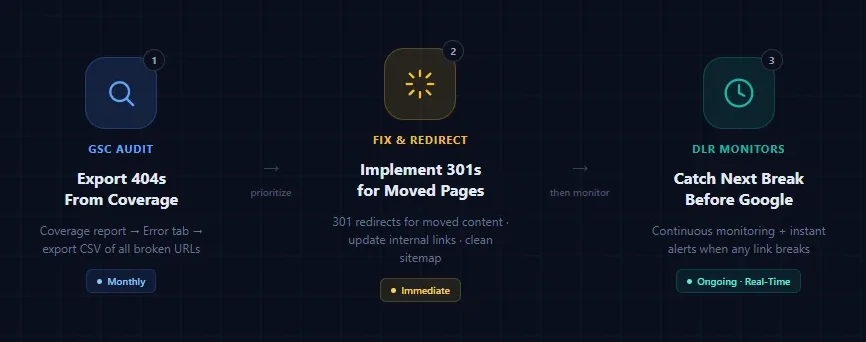
Complete broken link workflow: GSC audit → fix redirects → DLR monitors ongoing (click to view full size)
Case Study: From 40 GSC 404s to Zero New Issues
A content-heavy SaaS site running a resource library with several hundred articles came to DeadLinkRadar after noticing their organic traffic had declined 18% over six months. Their GSC Coverage report showed 40 hard 404s and 12 soft 404s—52 broken pages total.
The diagnosis: Two years of linking to external research papers, tool pages, and documentation resources. External sites had restructured, tools had been deprecated, and academic papers had moved to new repository URLs. None of it had been caught because the team had no automated broken link checker in place—only quarterly manual reviews.
The fix (week 1):
- 22 hard 404s from a domain migration 18 months prior—implemented 301 redirects
- 11 broken external outbound links—updated to current URLs or replaced with equivalent sources
- 7 soft 404s from a legacy content section—pages returned 200 but showed "Content archived" with no body text—returned proper 404 codes and redirected to updated articles
- 12 soft 404s from a linked external database that had restructured—updated links to new URL patterns
The monitoring setup (week 2): All 500+ external links the site linked to were imported into DeadLinkRadar. Weekly digest configured for standard links; email alerts on critical citation links.
30 days later: DeadLinkRadar caught 4 new broken links before Googlebot found them—two external tools that removed free tier documentation, one research paper moved to a new DOI URL, and one linked resource that had gone fully offline. All four were fixed within 24 hours of breaking.
GSC Coverage report, checked at the 30-day mark, showed zero new 404s.
The organic traffic trend reversed. By week 6, the team saw a 12% recovery in organic impressions—likely from the crawl budget being spent more efficiently now that Googlebot wasn't being routed to 52 dead pages every crawl cycle.
Dead Link Fix Reference: What to Do With Each 404 Type
Once you have your prioritized list from GSC, here are the right fixes for each scenario:
Page content moved to a new URL: Implement a 301 permanent redirect from the old URL to the new one. This passes link equity and gives search engines a valid destination. Do this for every URL that had traffic or backlinks.
Content was removed with no replacement: Return a proper 404 status code with a helpful error page. Include navigation links so users and crawlers can reach your active content. Update your sitemap to remove the URL.
Soft 404 from "no longer available" content: Configure your CMS or application to return a 404 status code instead of 200 when content is missing. A friendly error message is fine—it just needs the correct status code behind it.
External link you control (internal redirect): Update the link source to point to the correct destination URL. No redirect needed.
External link you don't control: Find the current URL (use Wayback Machine if the site is gone), update your link, or remove it if no equivalent resource exists.
Soft 404 from empty search/filter results: Add logic to return 404 when query parameters yield zero results, or add noindex and remove from sitemap if the page must remain accessible.
After fixing, use GSC's URL Inspection tool to request re-crawling for important pages. This speeds up the time from "fixed" to "Google knows it's fixed."
Summary: Check for Broken Links Before GSC Catches Them
Google Search Console's Coverage report and URL Inspection tool are essential starting points for any broken link audit. They show you exactly what Googlebot found broken, when it was crawled, and how to diagnose individual pages. The GSC data is accurate and authoritative—because it comes directly from Google.
The limitation is timing. GSC shows you the past. Links that break today won't appear in GSC until Googlebot's next visit, which could be days or weeks away. That gap is where user experience deteriorates, crawl budget leaks, and rankings slip.
Automated monitoring with DeadLinkRadar covers the gap between GSC reports. When you use a broken link checker that runs continuously, you find broken links the moment they occur—whether it's an external resource you cite, a product page on a linked site, or an internal page that got accidentally deleted—not the next time Googlebot happens to visit.
The combination is more powerful than either tool alone: GSC for historical audit and verification, DeadLinkRadar as your always-on dead link checker for ongoing prevention.
Key Takeaways
GSC Coverage report shows hard 404s (Error tab) and soft 404s (Valid with warnings). Export both, prioritize by clicks and sitemap inclusion.
URL Inspection diagnoses individual pages: last crawl date, current status, live test. Use it to verify fixes before requesting re-indexing.
Export + prioritize: Match your GSC 404 list against analytics data. Fix pages with recent impressions, sitemap entries, and known backlinks first.
GSC's gap: It reports what Googlebot already found. Links that break between crawl cycles are invisible until the next crawl. A dead link checker fills this window.
Automated monitoring catches links the moment they break—before Googlebot, before your users notice, before your rankings are affected. Use it to continuously find broken links that GSC hasn't flagged yet.
Next Steps
Use this guide to run your first GSC broken link audit today. Export the Coverage report errors, prioritize by impact, and fix your top broken links.
Then import your links into DeadLinkRadar—start with the pages and links most important to your organic traffic. Free accounts monitor up to 50 links with daily checks. No credit card required.
The goal: next time you open GSC's Coverage report, it should be quiet. Not because Google stopped finding broken links, but because you fixed them first.
Need help with your broken link audit? Contact our support team or explore the documentation for more technical guides on link health monitoring.