
A broken link checker is one of the most underused tools in an SEO toolkit — and the absence of one is quietly costing sites rankings every day. Every broken link on your site sends a signal to search engines that your content isn't maintained. Google's crawlers follow links to discover and index pages. When they hit a dead end — a 404, a redirect chain, a page that never loads — they note it. Over time, a site with too many broken links loses crawl budget, drops in rankings, and frustrates the readers it worked hard to earn.
The problem isn't that site owners don't care. It's that broken links are invisible until they're not. A vendor changes their URL structure. An old blog post you linked to gets deleted. An image CDN migration leaves behind hundreds of orphaned references. None of these announce themselves. They just quietly accumulate while your SEO erodes.
This guide covers how broken links affect your search rankings, how to find them with a dead link checker, and how to set up continuous monitoring that catches new breakages automatically — before Google does.
Why Broken Links Hurt SEO Rankings
Search engines use links as signals of quality and relevance. Internal links distribute authority across your site and help crawlers map your content. External links vouch for the sources you reference. When links break, those signals disappear — or worse, send negative signals.
Crawl budget waste is the most direct impact. Googlebot has a limited number of requests it makes to your site per crawl cycle. If those requests keep hitting 404 pages, the crawler spends time on dead ends instead of discovering new or updated content. For larger sites, this meaningfully reduces how much of your content gets indexed.
Link equity loss follows from 404 errors on internal links. Internal linking is how you direct authority from high-traffic pages to pages you want to rank. A broken internal link severs that transfer. The destination page gets no benefit from the source, and the crawl path is interrupted.
User experience signals compound the problem. Bounce rate increases when visitors click a link that leads nowhere. Time on site drops. These behavioral signals inform how search engines evaluate the quality of your content — even if the correlation isn't direct ranking factor territory, the pattern of user frustration is real.
Trust and authority matter for external links too. When you link to a resource that's gone dark, you're pointing readers at a dead end. For readers who notice, it signals that your content isn't kept up to date. For the broken link checker tools that auditors and competitors run against your site, it's a vulnerability in your content quality score.
What Types of Broken Links Damage SEO Most
Not all broken links are equally damaging. Understanding which types cause the most harm helps you prioritize your fix queue.
404 Errors on Internal Links
Internal links pointing to your own pages that return 404 are the highest priority. They interrupt crawl paths, sever link equity transfer, and create poor user experiences all in one. If your site has been around for years and you've ever renamed URLs, restructured categories, or deleted pages, you almost certainly have orphaned internal links.
Redirect Chains and Loops
A redirect that points to another redirect — and then possibly another — creates chains that dilute link equity with each hop. Crawlers have a redirect follow limit; chains that exceed it mean the destination page never gets crawled. Redirect loops, where A redirects to B and B redirects back to A, are even worse: they're completely unresolvable.
External Links to Deleted Pages
When you link out to a study, tool, or resource that later gets moved or deleted, the external link returns a 404 or worse — a parked domain that serves ads. External 404s don't affect your crawl budget the same way internal ones do, but they damage your credibility with readers and contribute to the overall picture of a neglected site.
Soft 404s (The Silent Problem)
Soft 404s are pages that return a 200 HTTP status code but display content like "Page not found" or "This product is no longer available." Standard broken link checkers miss them entirely because they only check status codes. These pages can consume crawl budget while providing no content value — Googlebot will eventually figure out they're not real pages and deprioritize them.
How to Find Broken Links: Broken Link Checker Methods
Manual Audit with a Broken Link Checker
The starting point for most sites is a one-time crawl using a broken link checker. These tools follow every link on your site, record status codes, and report which ones returned errors.
What to look for in a broken link checker:
- Internal link scanning — finds broken links between your own pages
- External link scanning — checks outbound links to third-party domains
- Redirect detection — identifies chains and loops, not just 404s
- Soft 404 detection — catches pages that look dead but return 200 status
A manual audit tells you where things stand right now. It doesn't tell you about links that break tomorrow.
Continuous Monitoring
The limitation of one-time audits is that the web changes constantly. A resource you linked to last month may have been deleted yesterday. An internal URL that worked during your last audit may have been renamed in a recent CMS update.
Continuous monitoring runs checks on a schedule and alerts you when new broken links appear. This shifts you from reactive (fixing what's already broken) to proactive (catching breakages before they accumulate).
We built DeadLinkRadar to do exactly this. After you add your links, we check them automatically and send you alerts — via email, Slack, Discord, or webhooks — when something breaks. You find out within hours, not months.
Setting Up Automatic Broken Link Monitoring
Here's how to set up ongoing monitoring so you're not discovering broken links through a drop in rankings.
Step 1: Import Your Links
Start by importing the URLs you want to monitor. DeadLinkRadar supports bulk import via CSV, paste, or our dashboard interface. You can add individual pages, entire sitemaps, or specific links you know are high-value.
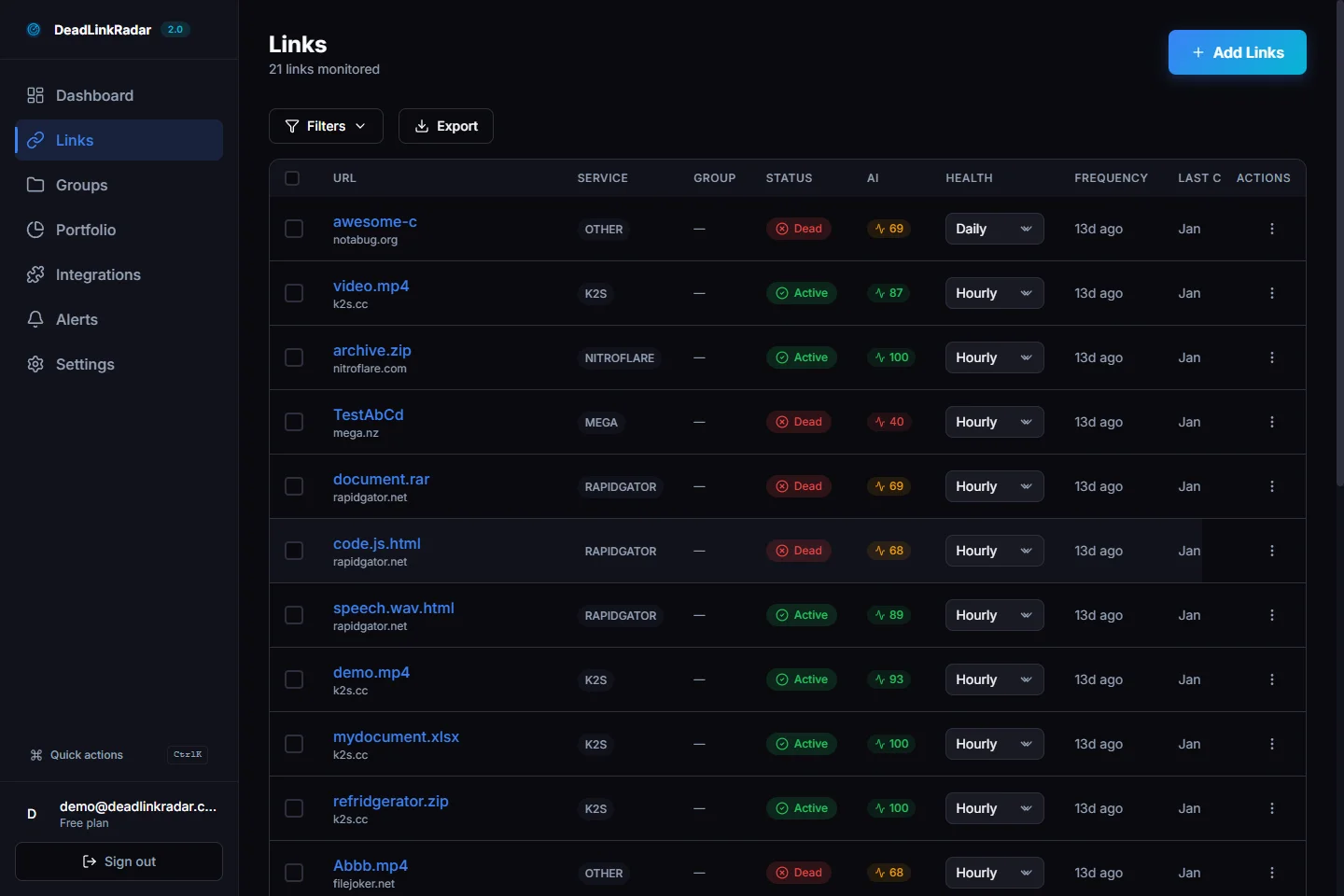
For most content sites, we recommend starting with:
- Your top 50-100 highest-traffic pages (from Google Search Console or analytics)
- Any pages with significant internal linking pointing to them
- Pages you know link to external resources heavily (roundups, resource lists, tool comparisons)
Step 2: Configure Check Frequency
Different links have different risk profiles. A link to a stable government domain is unlikely to break. A link to a startup's pricing page might change quarterly.
DeadLinkRadar lets you set check frequency per link or per group:
| Frequency | Best For |
|---|---|
| Hourly | Critical conversion pages, links to dynamic content |
| Daily | Internal links, links to actively maintained external sites |
| Weekly | Stable external references, archive links |
High-value pages — those driving significant organic traffic or anchor your site's authority — should be checked daily at minimum.
Step 3: Set Up Alerts
Monitoring without alerts is just logging. The value comes from finding out when something breaks.
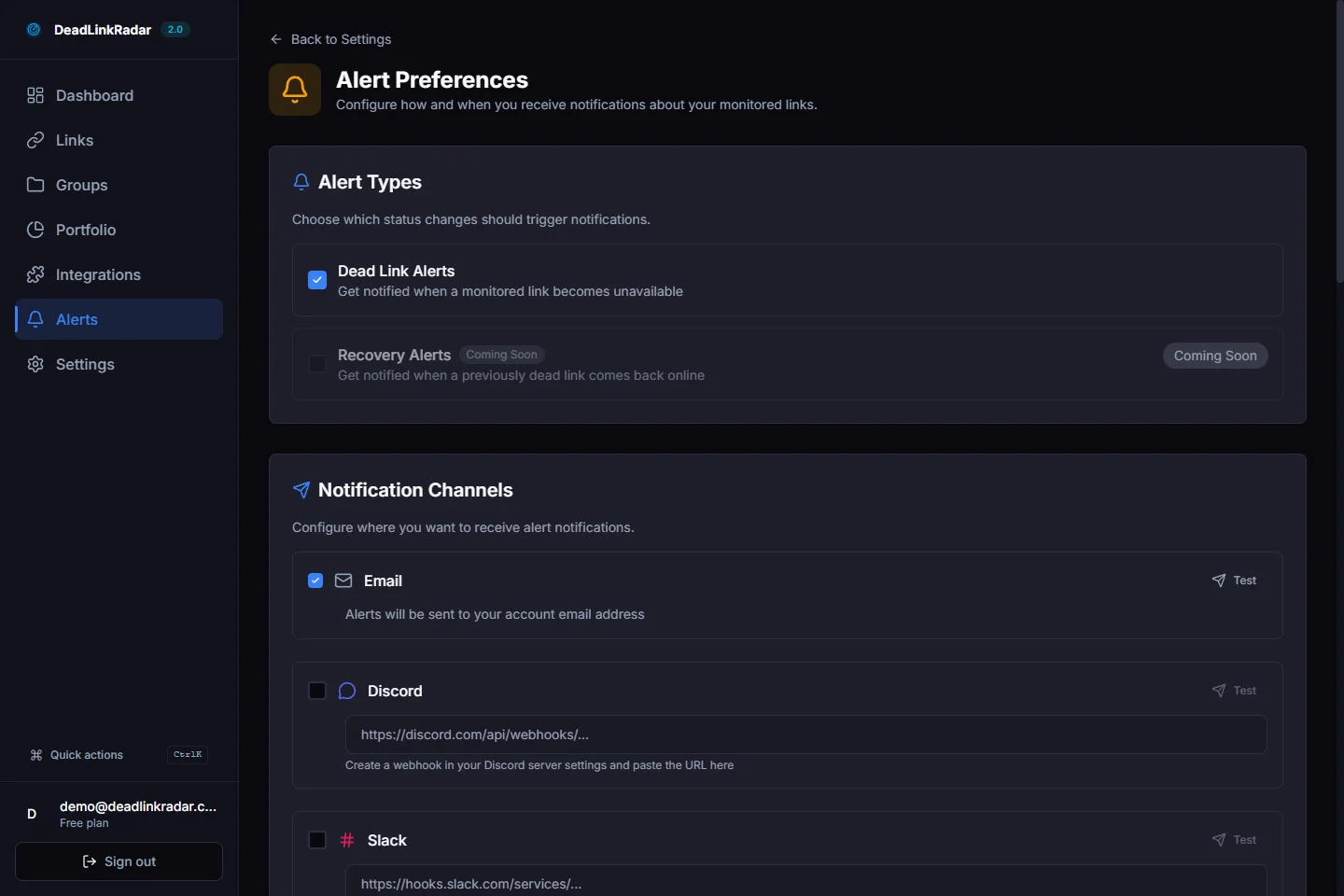
Configure alerts to match your workflow:
- Email — best for individual site owners or small teams; daily digest or immediate alerts
- Slack or Discord — good for teams who want broken link reports in their existing channels
- Webhooks — for custom integrations with your CMS, deployment pipeline, or project management tools
We recommend immediate alerts for any monitored link that returns a 404 or times out — these need attention quickly. Redirect chain warnings can go in a daily digest.
Step 4: Triage and Fix
When an alert fires, you have three options:
-
Fix the link — update the href to the correct URL. For internal links, this usually means updating your CMS. For external links, find the new URL of the resource or replace it with an equivalent.
-
Remove the link — if the resource is gone and there's no replacement, removing the broken link is better than leaving it pointing at a 404.
-
Replace the resource — for external links pointing to deleted content, find a higher-quality replacement. This is an opportunity to improve the link, not just repair it.
Common Sources of Broken Links (And How to Prevent Them)
Understanding where broken links come from helps you prevent them at the source.
URL Restructuring
Every time you change a URL structure — moving from /blog/post-title to /resources/post-title, or adding date prefixes to your archive — you create potential for orphaned links. Before restructuring, audit all internal links pointing to the affected URLs. Set up 301 redirects immediately and monitor that they resolve correctly.
CMS Plugin and Theme Updates
Content management systems that modify URL structures during updates are a significant source of broken links. Plugins that rename slugs, themes that alter archive URLs, and platform migrations that don't preserve URL structure all create breakage at scale. Always audit links after major CMS changes.
Third-Party Content Changes
External resources change without notice. Studies get moved behind paywalls. Startup tools get acquired and redirect to parent company pages. Open source projects get deprecated. For content that links heavily to external resources, scheduled external link checks are essential.
Image and Asset Links
Images loaded from external CDNs, embedded from third-party sites, or referenced with absolute URLs rather than relative paths are particularly vulnerable. A CDN migration, an image host shutting down, or a hotlinking policy change can break dozens of images at once.
Measuring the Impact of Broken Link Fixes
Once you've set up monitoring and started fixing broken links, how do you know it's making a difference?
Google Search Console is the primary measurement tool. After fixing broken links, check the Coverage report for decreases in 404 errors. The Crawl Stats report shows whether your crawl budget is being used more efficiently. Improvements take weeks to register — Googlebot needs to recrawl affected pages.
Rank tracking on pages that previously had broken internal links pointing to them can show ranking improvements as link equity flows properly again.
Crawl depth improvements show up when you run follow-up site audits. A reduction in broken links should correlate with better crawl coverage of your deeper pages.
The most valuable measurement is ongoing: with continuous monitoring in place, you should see the count of newly-discovered broken links trend toward zero over time. The goal isn't to eliminate broken links once — it's to find and fix them faster than they accumulate.
Quick Reference: Broken Link Monitoring Checklist
Use this when auditing a site or setting up monitoring for the first time:
- Run a full site crawl with a broken link checker
- Separate internal and external link errors into priority queues
- Fix 404 errors on high-traffic internal pages first
- Audit redirect chains for any chain longer than 2 hops
- Check for soft 404s on pages with thin or missing content
- Set up ongoing monitoring for all high-value URLs
- Configure alerts to your team's preferred channel
- Schedule a quarterly manual audit in addition to automated checks
- After major site changes (restructures, migrations, CMS updates), run an immediate audit
How to Prioritize Broken Link Fixes for Maximum SEO Impact
Not all broken links deserve the same urgency. When you're working through a large fix queue, prioritize by SEO impact rather than sheer volume.
Tier 1 — Fix immediately:
- Internal 404s on pages with high organic traffic
- Broken links on pages that rank in the top 10 for target keywords
- Broken links in site navigation (header, footer, sidebar)
- Broken canonical tags or hreflang references
Tier 2 — Fix within a week:
- External 404s on pages with significant backlinks pointing to them
- Redirect chains of 3 or more hops on crawled pages
- Broken links on high-converting landing pages
- Images that fail to load on product or feature pages
Tier 3 — Batch fix monthly:
- External links on lower-traffic posts pointing to deleted content
- Archive pages with broken citations
- Social share URLs that no longer resolve
This prioritization framework helps when you've uncovered hundreds of broken links in an initial audit. Fix the ones with the highest SEO leverage first, then work through the remainder systematically.
When to Remove vs. Redirect vs. Replace
Each broken link situation calls for a different resolution:
Redirect (301) — Use when you control the destination and the content has moved. This preserves link equity and user intent. Set up a permanent redirect at the server or CMS level. Check that the redirect itself doesn't create a chain.
Update the link — Use for external links where the resource moved to a new URL. Find the current location of the content and update your href. This is the cleanest fix when the resource still exists.
Remove the link — Use when the resource is permanently gone with no equivalent replacement. An orphaned link pointing to a 404 is worse than no link. Remove the anchor text and inline reference cleanly.
Replace with a better source — Use as an opportunity to upgrade. If a study you cited has been taken down, find a more recent or more authoritative source. This improves the content while fixing the link.
Start Monitoring Before Rankings Drop
Broken links are a slow leak. They don't cause dramatic ranking drops overnight — they erode authority, crawl efficiency, and user trust gradually. By the time a rankings decline is traceable to link rot, the damage has been accumulating for months.
The most effective approach is continuous monitoring that catches breakage as it happens. Set up a dead link checker that runs automatically, sends alerts to your workflow, and gives you a clear triage queue. Fix links before search engines record too many failed crawl attempts.