
Your broken link checker says everything is fine. Every URL returns HTTP 200 OK—green checkmarks across the board. Yet Google Search Console shows a growing list of "soft 404" errors, and your organic traffic keeps declining. The disconnect is maddening: how can a link be broken if your dead link checker says it works?
The problem is that traditional tools check for broken links by examining HTTP status codes only. They can't see what Google sees: pages that technically "load" but contain "Page Not Found" content. These soft 404 errors slip past every basic link health monitor while silently destroying your SEO rankings.
What Is a Soft 404? The Dead Link Your Checker Can't See
A soft 404 occurs when a page returns an HTTP 200 status code (success) but displays content indicating the page doesn't exist, is empty, or has no meaningful content. From an HTTP protocol perspective, the server says "here's your page, everything worked." From a user and search engine perspective, the page is effectively broken.
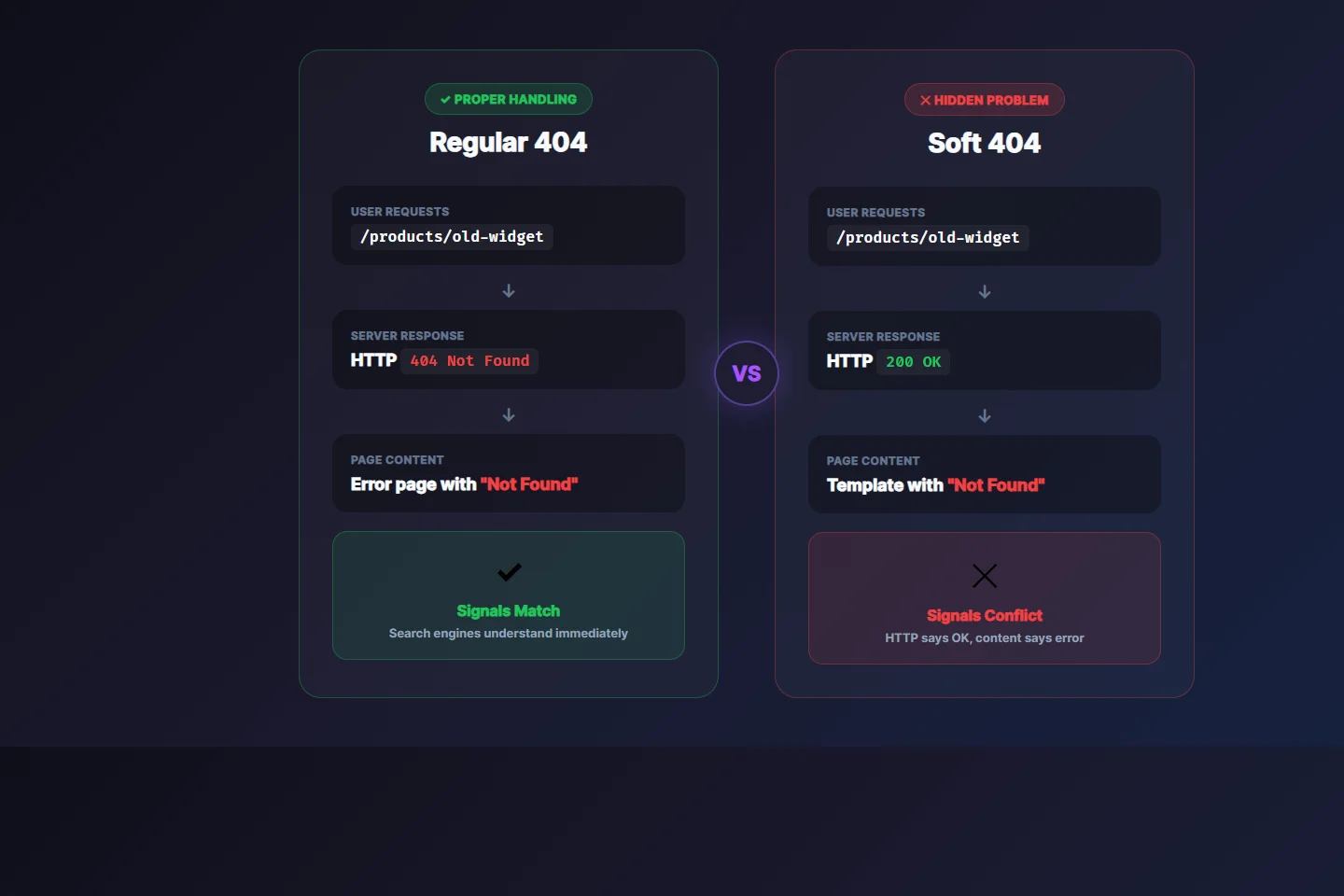
HTTP 200 vs Soft 404 comparison (click to view full size)
The distinction matters because search engines and basic link checkers rely heavily on HTTP status codes to understand page health. A proper 404 status code tells everyone "this page doesn't exist." A soft 404 sends mixed signals—the server claims success while the content screams failure.
Here's a concrete example. Imagine you have a product page at /products/widget-pro-2024. The product gets discontinued, and your CMS handles it by showing a friendly "Product Not Available" message instead of a proper 404 error. The URL still technically "works"—it returns HTTP 200 and renders a page—but that page has zero value for users or search engines.
Why Soft 404s Are Worse Than Regular 404s
Regular 404 errors are honest. They explicitly tell search engines "don't waste time here." Soft 404s, on the other hand, force search engines to figure out the problem on their own, which creates several cascading issues.
Crawl Budget Waste
Google allocates a finite crawl budget to each site based on server health and content quality. When Googlebot encounters soft 404 pages, it can't immediately tell they're worthless. It has to download the full page, analyze the content, and determine that it's a dead end. This wastes crawl budget that should be spent indexing your valuable content.
For large sites with thousands of soft 404s, the impact can be severe. Google has explicitly stated that "soft 404s can harm your site's crawling and indexing" because they consume resources without providing value.
Lost Link Equity
External sites linking to your soft 404 pages are essentially throwing away their link equity. Unlike a proper 404 (which search engines understand) or a 301 redirect (which passes link value), a soft 404 creates ambiguity. The linking page sends authority to a URL that appears valid but isn't—meaning that authority evaporates.
If you've built backlinks to pages that later became soft 404s, you've effectively lost all that link building effort. The external links still exist, but they're pointing to content that search engines have marked as worthless.
User Experience Signals
Users who land on soft 404 pages behave predictably: they bounce. High bounce rates and low dwell times send negative signals to search engines about your site's quality. Unlike a clear 404 error page (which users understand and forgive), a soft 404 often looks like a broken or low-quality page, damaging brand perception.
Index Bloat
Soft 404 pages can still get indexed if Google doesn't immediately detect them. This dilutes your site's overall quality signals and clutters search results with worthless pages. Every soft 404 in your index is a page that isn't contributing value—and might be actively harming your site's perceived quality.
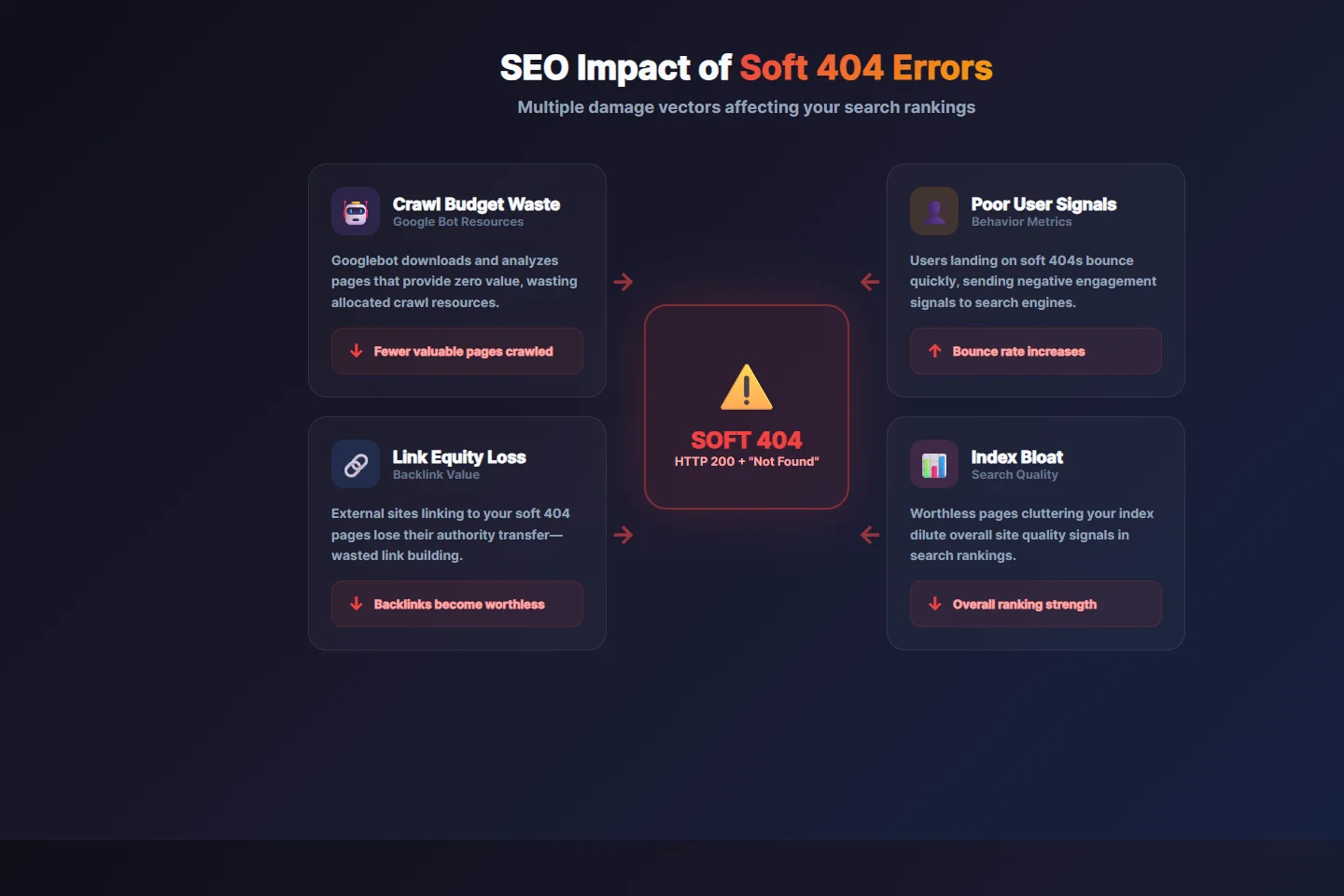
How soft 404s impact your SEO through multiple channels (click to view full size)
Common Causes of Soft 404 Errors
Understanding why soft 404s occur helps you prevent them. Here are the most frequent culprits:
CMS Default Behavior
Many content management systems handle missing content by displaying a friendly message rather than returning a proper 404 status. WordPress, Shopify, and custom CMS platforms often show "Product not found" or "Post unavailable" pages with HTTP 200 status codes. The intention is good (better user experience than a harsh error page), but the implementation creates SEO problems.
Improper Search Result Pages
When users search your site for something that doesn't exist, your internal search might return "No results found" with an HTTP 200 status. If these pages get indexed (through sitemaps, internal links, or external discovery), they become soft 404s in Google's eyes.
Empty Category or Tag Pages
Category pages with no products, tag archives with no posts, and filter combinations that return zero results often render as seemingly-valid pages. They have headers, navigation, footers—everything except meaningful content.
Paginated Series Gone Wrong
When you delete content from a paginated series, later pages in the series might become effectively empty while still returning HTTP 200. Page 47 of a 50-page series might suddenly have no content if items were removed.
Database Errors Handled Gracefully
Applications that catch database errors and display friendly error messages (instead of failing hard) can inadvertently create soft 404s. The error handling prevents ugly error pages but also prevents proper HTTP status codes.
Expired or Removed Products
E-commerce sites frequently have this problem. When products sell out, get discontinued, or are removed from catalog, the product pages often remain accessible but empty—perfect soft 404 candidates.
Why Your Broken Link Checker Misses Soft 404s
Here's the fundamental problem with most link checking tools: they only examine HTTP status codes. Their logic is simple:
- HTTP 200 = Link works
- HTTP 404 = Link broken
- HTTP 301/302 = Redirect (follow it)
- HTTP 500 = Server error
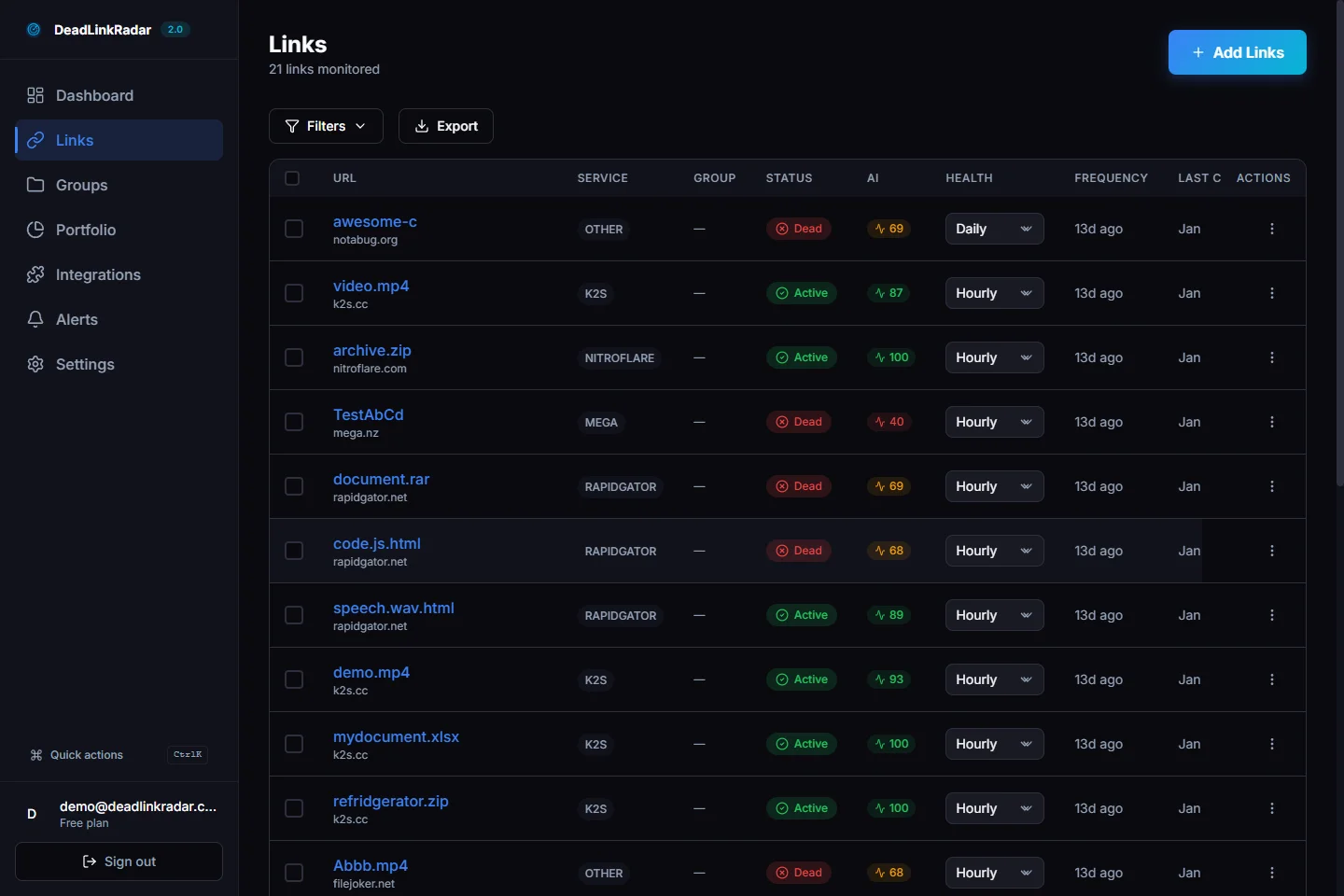
Basic checkers stop at HTTP 200; smart detection analyzes content (click to view full size)
This approach worked fine when the web was simpler. Modern web applications, however, routinely return HTTP 200 for pages that are effectively broken. A basic link checker running against your site might report 100% healthy links while you're hemorrhaging SEO value through hundreds of soft 404s.
The gap between "HTTP says OK" and "content is actually useful" is exactly where soft 404s hide. Without content analysis, you're flying blind.
Detecting Soft 404s: What to Look For
Soft 404 detection requires examining page content, not just HTTP headers. Here are the patterns that indicate a soft 404:
Title Tag Indicators
Pages with titles containing phrases like "Page Not Found," "404," "Error," "Product Unavailable," or "No Results" are strong soft 404 candidates—regardless of their HTTP status code.
Thin Content
Pages with very little text content (under 50-100 words) that appear to be error or placeholder pages rather than intentionally minimal content.
Meta Robot Tags
Pages that include <meta name="robots" content="noindex"> while returning HTTP 200 are often soft 404s—the site owner is trying to keep them out of search results while not properly handling the HTTP response.
Common Error Phrases in Body
Content containing phrases like "page doesn't exist," "couldn't find," "no longer available," "has been removed," or "try searching" combined with HTTP 200 status.
Empty Main Content Areas
Pages where the main content container is empty or contains only boilerplate (navigation, footer, sidebar) without actual content.
Redirect Detection Meta Tags
Some CMS platforms use meta refresh tags or JavaScript redirects to handle missing content. While the initial page returns HTTP 200, it immediately redirects to an error page.
How to Check for Broken Links That Hide as HTTP 200
Finding soft 404s requires a fundamentally different approach than traditional broken link checking. You need tools that understand the difference between HTTP success and content success.
Manual Detection Methods
If you're checking for broken links manually, here are signs that a page might be a soft 404:
Check the page title: Load the page and look at the browser tab. Titles containing "Not Found," "404," "Error," "Unavailable," or "No Results" while the page loads normally indicate a soft 404.
Examine the main content: Is there meaningful content, or just navigation and footer elements? A page with headers and sidebars but an empty main content area is likely a soft 404.
Look for redirect patterns: Some soft 404s use JavaScript or meta refresh tags to redirect to an error page after loading. If the page briefly shows content then jumps elsewhere, it's a soft 404.
Test with View Source: Check if the page contains meta robots tags like noindex combined with an HTTP 200 status. This often indicates the site owner knows it's a dead link but hasn't properly configured the server response.
Automated Detection with Content Analysis
Manual checking doesn't scale. For sites with hundreds or thousands of links, you need automated tools that analyze content, not just status codes. DeadLinkRadar uses smart detection that goes beyond simple HTTP status checking. When we check a link, we analyze the actual page content to identify soft 404 patterns that would fool basic link checkers.
Our system examines multiple signals simultaneously:
Title tag analysis: We parse the page title looking for common error phrases. A page titled "Widget Pro - MyStore" is probably valid; a page titled "Page Not Found - MyStore" is almost certainly a soft 404.
Content pattern matching: We analyze the main content area for phrases like "page doesn't exist," "couldn't find what you're looking for," "has been removed," or "try searching instead." These patterns indicate soft 404s regardless of HTTP status.
Meta robots detection: Pages with noindex directives combined with HTTP 200 responses are flagged as potential soft 404s since the site owner is explicitly trying to keep them out of search engines.
Structure analysis: We examine whether the page has meaningful content beyond boilerplate (navigation, headers, footers). A page where the main content container is empty or nearly empty triggers soft 404 warnings.
This multi-signal approach catches soft 404s that single-check methods miss. A page might have a normal-looking title but empty content, or normal content but a noindex directive—our system correlates all available signals to make accurate determinations.
Why Continuous Monitoring Matters for Dead Link Detection
Soft 404s often emerge gradually rather than appearing all at once. A site that works perfectly today might develop soft 404s next month when products get removed, content expires, or a CMS update changes error handling. Continuous monitoring with content analysis catches these issues as they appear rather than after they've accumulated.
The difference shows up most clearly in large-scale monitoring. A basic broken link checker might report your 500 monitored links as 100% healthy. Our smart detection might find that 23 of those links are actually soft 404s that need attention—dead links that are hurting your SEO while appearing fine in simpler tools.
For sites that frequently update content, remove products, or restructure sections, continuous monitoring is essential. Checking for broken links once per month with a basic tool leaves weeks where soft 404s accumulate undetected. Real-time monitoring with content analysis provides visibility into link health as it changes.
Fix Dead Links and Soft 404s: Complete Strategy
Once you've identified soft 404s, you have several options for fixing them:
Return Proper 404 Status Codes
The most straightforward fix is configuring your server or application to return HTTP 404 status codes for pages that genuinely don't exist. This is honest signaling—telling browsers and search engines exactly what's happening.
For WordPress, this might mean adjusting how your theme handles missing posts. For custom applications, it means ensuring your error handling returns appropriate HTTP status codes alongside friendly error messages.
Implement 301 Redirects
If the content has moved to a new URL, implement a 301 (permanent) redirect from the old URL to the new one. This preserves link equity and provides a good user experience. Only use this when there's genuinely equivalent content at the new destination—redirecting a discontinued product page to your homepage is just moving the problem.
Restore or Recreate Content
Sometimes the best fix is bringing the content back. If you removed a popular blog post or product page that still receives traffic and backlinks, consider restoring it or creating updated replacement content at the same URL.
Noindex + 404 Combination
For pages that must remain accessible (perhaps for historical reasons or internal use) but shouldn't be indexed, you can combine a noindex directive with proper 404 status code signaling. This tells search engines to ignore the page while keeping it available.
Update Sitemaps and Internal Links
After fixing soft 404s, update your XML sitemaps to remove the affected URLs and audit your internal linking to ensure you're not linking to fixed/removed pages. Orphaning the URLs helps search engines understand they're no longer part of your active site.
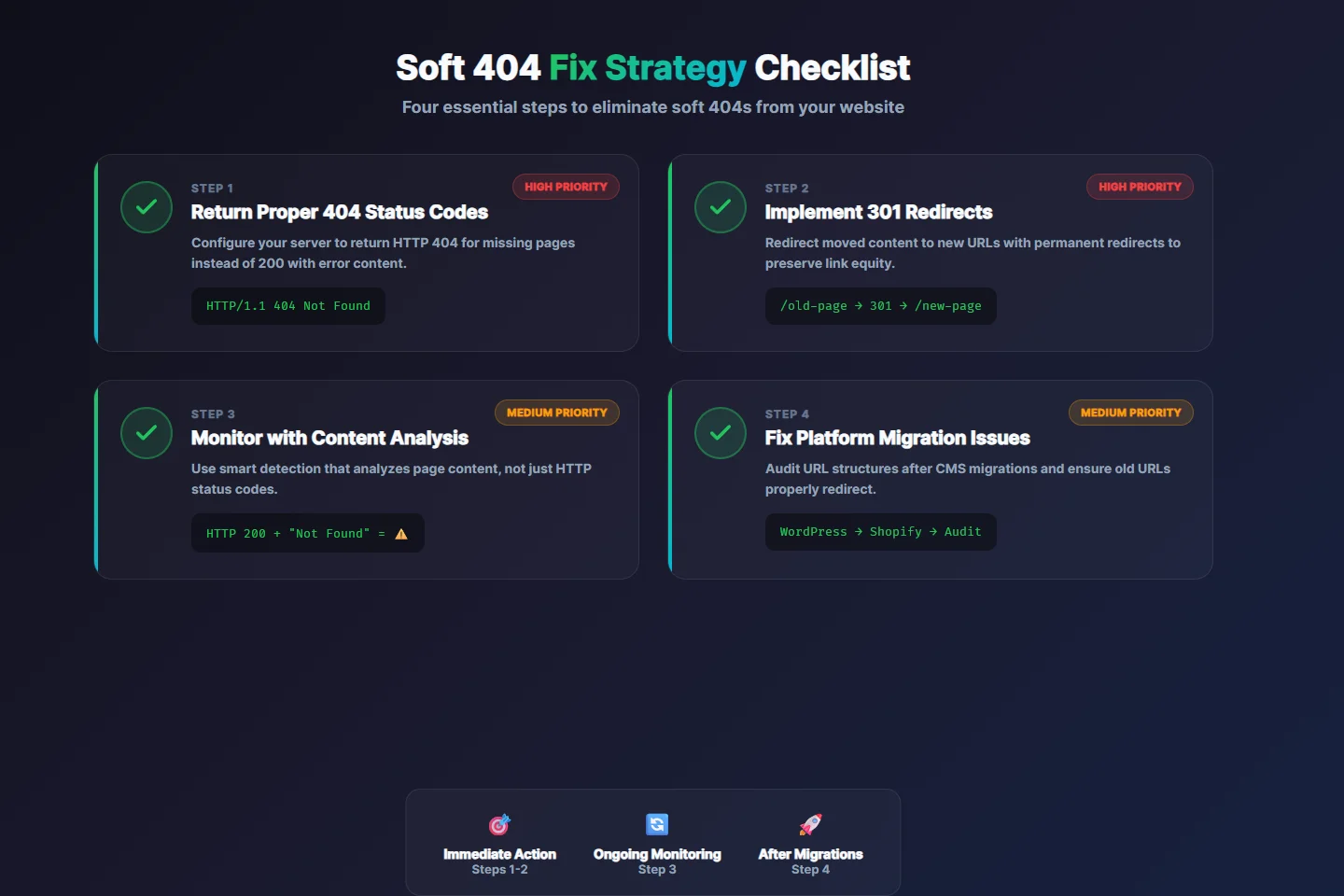
Soft 404 fix strategy checklist (click to view full size)
Prevent Broken Links and Soft 404s Before They Happen
Prevention beats remediation. Here's how to avoid creating soft 404s in the first place and establish a robust dead link prevention strategy:
Configure CMS Error Handling
Review how your content management system handles missing content. Most platforms can be configured to return proper 404 status codes instead of HTTP 200 with error messages. This is usually a theme or server configuration change rather than a core CMS modification.
For WordPress sites, check your theme's 404.php template and ensure your server configuration (nginx or Apache) isn't overriding the response code. For Shopify, review how out-of-stock and removed products are handled—the default behavior often creates soft 404s.
Custom applications need explicit error handling. When a database query returns no results for a requested resource, return HTTP 404 rather than HTTP 200 with an "Item not found" message. This small change prevents soft 404 accumulation.
Audit Before Migrations
Platform migrations are soft 404 breeding grounds. Before migrating from WordPress to Shopify, or from one CMS version to another, create a comprehensive URL inventory. Document every URL that currently exists and receives traffic.
After migration, verify that all URLs either work correctly, redirect properly, or return 404 status codes—no soft 404s allowed. Use a broken link checker with content analysis to verify the migration didn't introduce hidden problems. Many migrations look successful at first glance but leave hundreds of soft 404s behind.
Handle Product Lifecycle Properly
Create a standard process for product end-of-life. When products are discontinued, decide upfront: will the page return 404, redirect to a category page, or redirect to a replacement product? Implement the decision consistently across your catalog.
Document your product lifecycle policy so everyone on your team handles deletions the same way. Inconsistent handling leads to a mix of proper 404s, soft 404s, and orphaned redirects that confuse both search engines and users.
Set Up Continuous Link Monitoring
Automated monitoring that includes content analysis—not just status code checking—is essential for catching soft 404s early. Soft 404s can emerge from CMS updates, plugin changes, database issues, or content management workflows. These problems appear without warning.
Configure alerts so you know immediately when new soft 404s appear. Weekly digest reports help you track trends and identify patterns, like a specific product category generating more soft 404s than others.
Test Error Handling During Development
Include soft 404 detection in your QA process. When developing new features or updating existing ones, test what happens when content is missing or queries return no results. Verify that your application returns appropriate HTTP status codes.
Add automated tests that specifically check for soft 404 conditions. Request known-invalid URLs and confirm the response is HTTP 404, not HTTP 200 with error content. This prevents regressions when code changes accidentally introduce soft 404 behavior.
Create URL Governance Policies
Establish policies about URL structure and permanence. Once a URL is published and starts receiving traffic or backlinks, it should either stay valid forever or redirect to appropriate replacement content. "Delete and forget" should never be an option for URLs that have been public.
Document your URL governance in a team wiki or runbook. Include procedures for content removal, product discontinuation, and site restructures. Make soft 404 prevention an explicit part of every content lifecycle decision.
The Cost of Ignoring Soft 404s
Soft 404s compound over time. One or two might not measurably impact your SEO. But as they accumulate—through product churn, content archiving, site restructures, and normal content lifecycle—the collective impact grows.
Consider a medium-sized e-commerce site with 10,000 products. If 5% of product pages become soft 404s after two years of product turnover, that's 500 pages confusing search engines. Those 500 pages are wasting crawl budget, losing link equity, and signaling that the site might not be well-maintained.
The fix isn't difficult, but it requires awareness and proper tooling. You can't fix what you can't see, and basic link checkers can't see soft 404s.
Summary: Stop Soft 404s From Killing Your SEO
Soft 404 errors are HTTP 200 responses that display "not found" or empty content—dead links that lie about their status. They're worse than regular 404s because they waste crawl budget, lose link equity, damage user experience metrics, and can bloat your index with worthless pages. For SEO-conscious site owners, soft 404s represent one of the most frustrating problems because they're invisible to basic monitoring.
Traditional broken link checkers miss soft 404s entirely because they only examine HTTP status codes. When a page returns HTTP 200, these tools report it as healthy—regardless of what content that page actually displays. This fundamental limitation means you could have hundreds of soft 404s damaging your SEO while your link checker shows a clean bill of health.
Detecting soft 404s requires content analysis: examining titles, meta tags, body content, and page structure for signs that a "successful" HTTP response is actually an error page in disguise. This is exactly what DeadLinkRadar's smart detection provides.
Key Takeaways
What soft 404s are: Pages that return HTTP 200 OK but display "not found" or empty content. They're dead links that basic tools can't detect.
Why they hurt SEO: Wasted crawl budget, lost link equity from backlinks, poor user experience signals, and index bloat with worthless pages.
Why basic tools miss them: Traditional broken link checkers only examine HTTP status codes. HTTP 200 = healthy, regardless of actual content.
How to detect them: Content analysis that examines page titles, body text, meta tags, and structure—not just HTTP responses.
How to fix them: Return proper 404 status codes, implement 301 redirects for moved content, and restore valuable pages that were incorrectly removed.
How to prevent them: Configure CMS error handling correctly, audit before migrations, establish product lifecycle policies, and monitor continuously with content-aware tools.
Next Steps
If you've been using a basic broken link checker that only examines HTTP status codes, you likely have soft 404s hiding in your link inventory. The only way to find them is with content analysis.
Ready to find the soft 404s hiding in your links? Start monitoring with DeadLinkRadar and see what your current tools are missing. Our smart detection catches the dead links that basic checkers overlook—before they damage your search rankings.
Need help? Contact support or explore our documentation for detailed guides on link monitoring best practices.