
Your WordPress link checker plugin is slowing down your site.
Right now, it's consuming server resources during peak traffic hours. It's running unreliable scheduled checks that miss broken links. And it's creating potential security vulnerabilities.
If you're managing a WordPress site with hundreds or thousands of links—whether you're running an e-commerce store, content-heavy blog, or documentation site—you've probably experienced the frustration of traditional WordPress broken link checker plugins. The industry is shifting toward cloud-based link monitoring for good reasons: better performance, more reliable detection, and zero impact on your hosting infrastructure.
In this guide, we'll show you why content creators are making the switch and how you can monitor your WordPress links without installing another resource-hungry plugin.
The WordPress Plugin Problem
WordPress plugins for link checking have been the default solution for years. Install a plugin, let it crawl your site, and receive notifications when links break. Simple, right? Not quite. Traditional WordPress link checker plugins create several critical problems that most site owners don't realize until it's too late.
Performance Impact: The Hidden Cost
Every WordPress broken link checker plugin runs on your server. When the plugin checks hundreds or thousands of links, it consumes:
- CPU cycles during cron job execution
- Memory to store link databases and crawl results
- Database queries that compete with your actual site traffic
- Network bandwidth for outbound link verification requests
For high-traffic WordPress sites, this means your link checker is directly competing with your visitors for server resources. During peak traffic hours, automated link checks can slow page load times, trigger timeout errors, or even cause server crashes on budget hosting plans.
The problem compounds when you're checking external links. Most WordPress link monitoring plugins use your server's IP address for outbound requests. If a destination site rate-limits or blocks your IP, your entire WordPress site suffers the consequences—not just the link checker.
Reliability Issues: Missed Checks and Incomplete Scans
WordPress cron jobs are notoriously unreliable. They depend on visitor traffic to trigger scheduled tasks. Low-traffic WordPress sites might skip scheduled link checks entirely. High-traffic sites experience race conditions where multiple cron jobs try to run simultaneously, creating conflicts.
Traditional plugins also struggle with soft-404 detection. A link might return HTTP 200 (OK) but display "Page Not Found" content—something basic plugins miss entirely. By the time your WordPress link checker flags the issue, search engines have already penalized your SEO rankings.
Timeout errors are another common failure point. If your hosting environment has strict execution time limits (common on shared hosting), link checking processes terminate mid-scan. You're left with incomplete results and no indication that checks failed.
Security Vulnerabilities: The Plugin Ecosystem Risk
Every WordPress plugin is a potential security entry point. Outdated link checker plugins with unpatched vulnerabilities expose your site to attacks. Even well-maintained plugins require regular updates, adding to your maintenance burden.
Permission issues are equally problematic. Link checking plugins need write access to your WordPress database to store results. If the plugin is compromised, attackers gain database access—potentially exposing sensitive user data, post content, and site configuration.
Plugin Conflicts: Compatibility Nightmares
WordPress link monitoring plugins don't operate in isolation. They interact with your theme, caching plugins, security plugins, and other site extensions. We've seen common conflicts including:
- Caching plugins serving stale link check results
- Security plugins blocking the link checker's outbound requests
- Page builders interfering with link extraction from custom elements
- Multilingual plugins causing duplicate link entries or missed translations
Debugging these conflicts consumes hours of developer time. Often, the only solution is disabling features or choosing between plugins—neither ideal for WordPress site owners who need reliable link health monitoring.
The Cloud-Based Alternative
Cloud-based link monitoring flips the traditional model. Instead of running checks on your WordPress server, monitoring happens on external infrastructure purpose-built for link health verification. Your WordPress site becomes a client that submits links for monitoring, rather than performing the checks itself.
How Cloud-Based Monitoring Works
The architecture is straightforward:
- Export links from your WordPress site (one-time bulk import or API integration)
- Cloud infrastructure performs scheduled checks on independent servers
- Monitoring service detects broken links, soft-404s, and connection issues
- Alerts arrive via email, Slack, Discord, or webhook—no WordPress dashboard required
This API-first approach decouples link monitoring from your hosting environment. Your server never executes link checks. Your database never stores monitoring results. Your bandwidth stays dedicated to serving visitors.
Key Benefits Over Traditional Plugins
Zero server impact. Cloud-based monitoring consumes zero hosting resources. No cron jobs. No database overhead. No memory consumption. Your WordPress site runs faster because it's not simultaneously checking hundreds of links.
24/7 independent monitoring. Checks run on reliable infrastructure with guaranteed uptime. Low-traffic sites get the same monitoring frequency as high-traffic sites. No dependency on visitor counts or cron reliability.
Advanced detection capabilities. Cloud services can implement sophisticated detection methods that are impractical for WordPress plugins:
- AI-powered soft-404 detection that analyzes page content
- Confidence scoring for ambiguous link states
- Multi-stage verification to reduce false positives
- Support for specialized services (file hosts, video platforms, social media embeds)
Multi-site management from one dashboard. If you manage multiple WordPress sites, cloud-based monitoring provides a unified view. Monitor all your sites' link health without logging into separate WordPress dashboards or maintaining multiple plugin configurations.
Security isolation. Your WordPress site never handles sensitive monitoring credentials. Rate limits and IP blocks affect the monitoring service, not your production site. If the monitoring service is compromised, your WordPress database remains protected.
Why WordPress Owners Are Switching
The shift to cloud-based WordPress link monitoring isn't just about technology—it's about solving real problems that traditional plugins can't address.
Performance: Faster Sites, Happy Visitors
Every millisecond of page load time affects conversion rates and SEO rankings. Google's Core Web Vitals penalize slow-loading WordPress sites. When your link checker plugin consumes server resources during traffic spikes, visitors experience:
- Longer time-to-first-byte (TTFB)
- Delayed interactive elements
- Timeout errors on resource-constrained hosting
Cloud-based monitoring eliminates this entirely. Your WordPress site serves content at full speed because link verification happens elsewhere. For e-commerce sites, this directly impacts revenue. Studies show a 100ms page load delay reduces conversions by 7%.
Reliability: Never Miss a Broken Link Again
Traditional WordPress broken link checker plugins fail silently. Your scheduled check didn't run because cron didn't fire? You won't know until you manually check the logs. A link broke between weekly scans? It stayed broken for seven days, accumulating SEO penalties.
Cloud-based monitoring provides:
- Guaranteed check frequency (every 15 minutes, hourly, daily—your choice)
- Instant alerts when links break (email, Slack, Discord, Teams, webhooks)
- Historical tracking to identify patterns and recurring issues
- Confidence scores that help prioritize which links need attention first
For content creators managing hundreds of resource pages or affiliate links, this reliability is crucial. Every hour a broken affiliate link goes unnoticed is lost revenue.
Scale: Manage Thousands of Links Effortlessly
WordPress plugins struggle at scale. Checking 10,000 links might take hours on your server, consuming resources the entire time. Cloud-based monitoring parallelizes checks across distributed infrastructure, completing the same verification in minutes.
This matters for:
- Documentation sites with extensive cross-references
- Content hubs with years of archived posts
- E-commerce stores with thousands of product links and supplier references
- Multi-site networks managing multiple WordPress installations
Traditional plugins force you to choose between completeness and performance. Cloud monitoring delivers both.
Modern Detection: Catch Links Other Tools Miss
Basic WordPress link checkers only verify HTTP status codes. They miss soft-404 patterns where servers return "200 OK" but display error pages. They can't detect login walls on membership sites. They struggle with JavaScript-rendered content.
Cloud-based services implement sophisticated detection strategies:
AI-powered content analysis examines page structure to identify error patterns. If a page title contains "Page Not Found" or displays minimal content despite a 200 status, AI flagging prevents false negatives.
Multi-strategy verification tests links using multiple approaches: HEAD requests for speed, GET requests with content analysis for accuracy, and specialized detection for services like YouTube, Vimeo, and file hosts.
Bypass capabilities handle sites with aggressive bot protection (Cloudflare challenges, CAPTCHA) that block traditional plugin requests.
For WordPress site owners focused on SEO, catching these hidden broken links before search engines do is the difference between maintaining rankings and watching organic traffic decline.
Security: Reduce Your WordPress Attack Surface
Every WordPress plugin expands your attack surface. The 2023 Wordfence threat report found that 97% of WordPress vulnerabilities come from plugins and themes. Link checker plugins with database write access, scheduled tasks, and network requests create multiple potential exploit vectors.
Cloud-based monitoring keeps credentials and monitoring logic off your WordPress server entirely. If your WordPress site is compromised, attackers gain no access to your monitoring service. If your monitoring service is compromised, your WordPress database remains protected.
This separation of concerns follows security best practices: minimize privileged code on production servers.
How to Monitor WordPress Links Without a Plugin
Now that you understand why traditional plugins fall short, let's explore how to implement cloud-based link monitoring for your WordPress site—without installing a single plugin.
Switching to cloud-based link monitoring doesn't mean abandoning WordPress. You have multiple integration options depending on your technical comfort level and site requirements.
Method 1: Bulk Import (Easiest)
The simplest approach exports all existing links from your WordPress site for one-time import.
Step 1: Extract links from WordPress.
If you have database access:
SELECT DISTINCT meta_value
FROM wp_postmeta
WHERE meta_key = '_links'
UNION
SELECT DISTINCT guid
FROM wp_posts
WHERE post_type = 'attachment';
For content-embedded links, export posts and extract URLs:
# Export all posts to JSON
wp post list --post_type=post,page --format=json > posts.json

# Extract URLs from content
cat posts.json | jq -r '.[].post_content' | \
  grep -oP 'href="\Khttps?://[^"]+' | \
  sort -u > wordpress-links.csv
Step 2: Bulk import to your monitoring service.
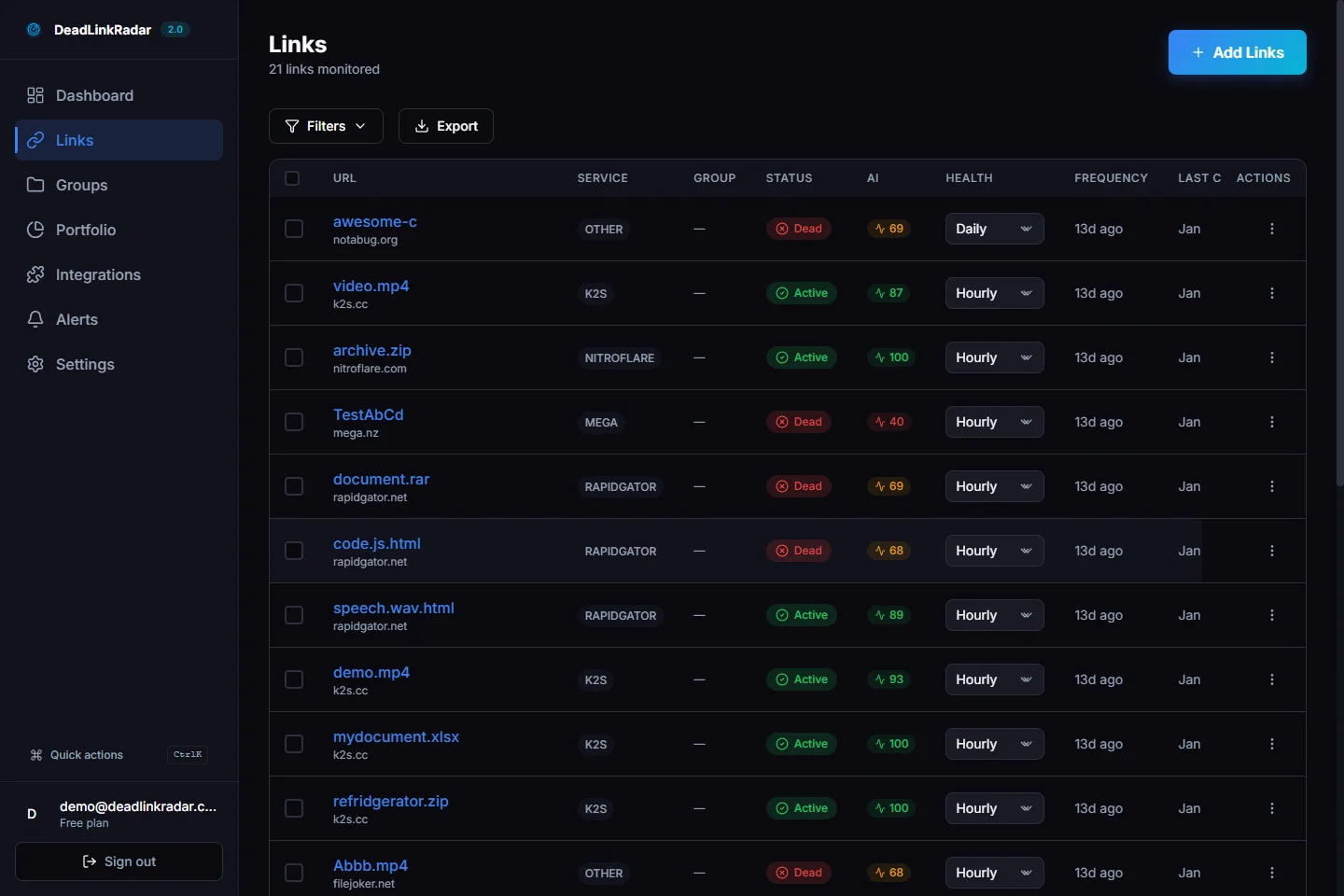
Most cloud-based link monitoring services provide:
- CSV upload interfaces
- JSON import endpoints
- API bulk import methods
Simply upload your exported links, assign a monitoring frequency (15 minutes, hourly, daily), and configure alert channels.
Step 3: Set up alerts.
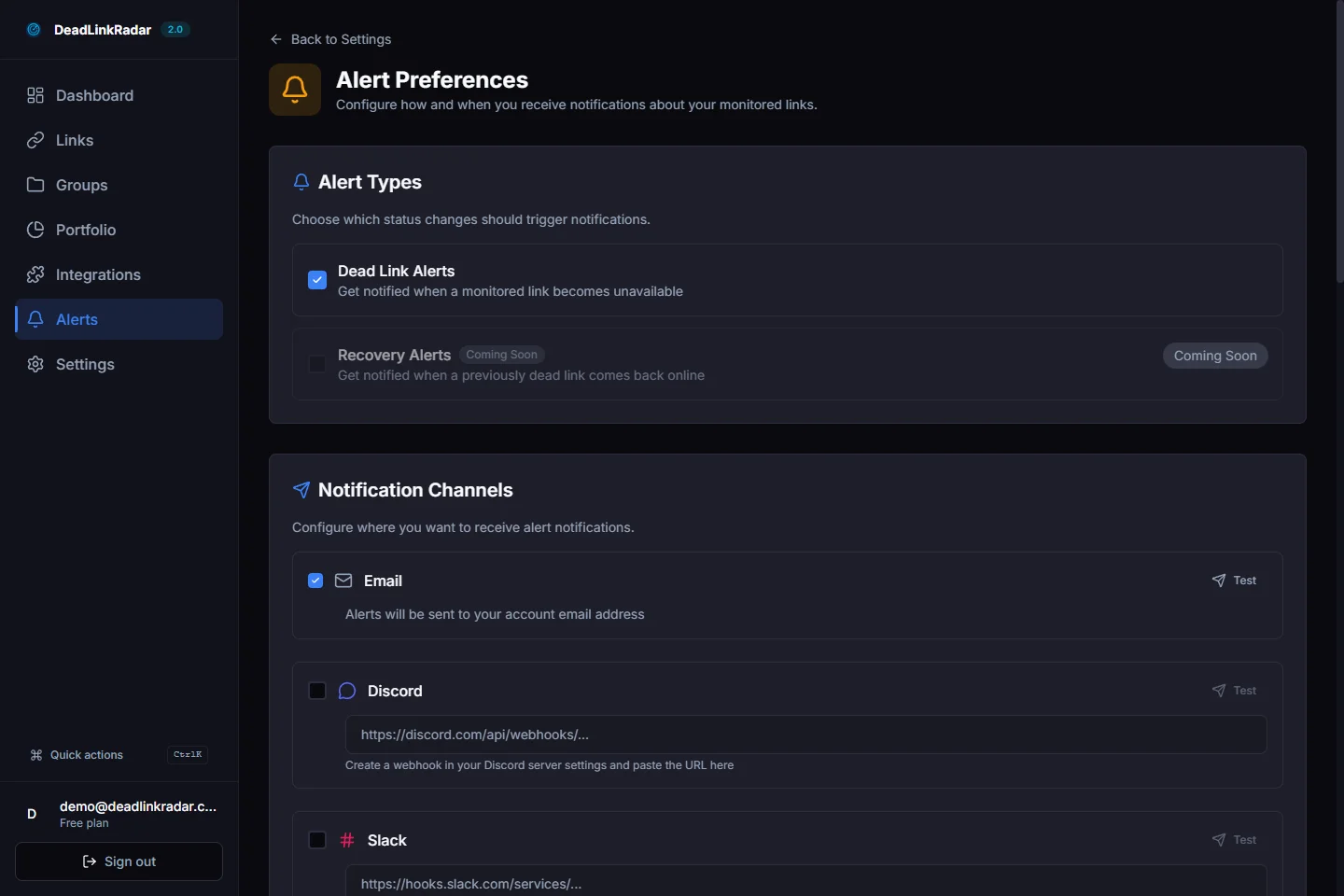
Configure notification channels so you're informed immediately when links break:
- Email for critical broken links
- Slack for team collaboration on fixes
- Discord for community-managed sites
- Webhooks for custom integrations with your workflow tools
Maintenance: Schedule monthly bulk exports to catch new links added through WordPress content updates.
Method 2: API Integration (Most Powerful)
For automated synchronization, integrate your WordPress site with your monitoring service's API. New links get monitored automatically when you publish posts.
Implementation example:
Add this to your WordPress theme's functions.php or create a custom plugin:
<?php
/**
 * DeadLinkRadar WordPress Integration
 * Automatically sync new posts to link monitoring
 */

add_action('publish_post', 'dlr_sync_post_links', 10, 2);

function dlr_sync_post_links($post_id, $post) {
    $api_key = get_option('dlr_api_key');
    if (!$api_key) return;

    // Extract all links from post content
    $content = $post->post_content;
    preg_match_all('/<a[^>]+href=["\'](https?:\/\/[^"\']+)["\'][^>]*>/i', $content, $matches);
    $links = $matches[1];

    if (empty($links)) return;

    // Send to monitoring API
    $response = wp_remote_post('https://deadlinkradar.com/api/v1/links/batch', array(
        'headers' => array(
            'Authorization' => 'Bearer ' . $api_key,
            'Content-Type' => 'application/json'
        ),
        'body' => json_encode(array(
            'links' => array_map(function($url) use ($post) {
                return array(
                    'url' => $url,
                    'check_frequency' => 'daily'
                );
            }, $links)
        ))
    ));

    if (is_wp_error($response)) {
        error_log('Link monitoring sync failed: ' . $response->get_error_message());
    }
}

// Add settings page for API key configuration
add_action('admin_menu', 'dlr_add_settings_page');

function dlr_add_settings_page() {
    add_options_page(
        'Link Monitoring Settings',
        'Link Monitoring',
        'manage_options',
        'dlr-settings',
        'dlr_settings_page'
    );
}

function dlr_settings_page() {
    ?>
    <div class="wrap">
        <h1>Link Monitoring Settings</h1>
        <form method="post" action="options.php">
            <?php
            settings_fields('dlr_settings');
            do_settings_sections('dlr-settings');
            submit_button();
            ?>
        </form>
    </div>
    <?php
}

add_action('admin_init', 'dlr_settings_init');

function dlr_settings_init() {
    register_setting('dlr_settings', 'dlr_api_key');

    add_settings_section(
        'dlr_api_section',
        'API Configuration',
        'dlr_section_callback',
        'dlr-settings'
    );

    add_settings_field(
        'dlr_api_key',
        'API Key',
        'dlr_api_key_callback',
        'dlr-settings',
        'dlr_api_section'
    );
}

function dlr_section_callback() {
    echo '<p>Enter your link monitoring service API key to enable automatic synchronization.</p>';
}

function dlr_api_key_callback() {
    $api_key = get_option('dlr_api_key');
    echo '<input type="text" id="dlr_api_key" name="dlr_api_key" value="' . esc_attr($api_key) . '" size="50" />';
}
?>
This integration automatically submits new links when you publish WordPress posts. No manual exports required.
For WP-CLI users:
# One-time setup: Store API key
wp option add dlr_api_key "your-api-key-here"

# Automated sync script (run via cron)
wp post list --post_type=post,page --format=json | \
  jq -r '.[] | .post_content' | \
  grep -oP 'href="\Khttps?://[^"]+' | \
  sort -u | \
  jq -R -s -c 'split("\n") | map(select(length > 0) | {url: ., check_frequency: "daily"}) | {links: .}' | \
  curl -X POST https://deadlinkradar.com/api/v1/links/batch \
    -H "Authorization: Bearer $(wp option get dlr_api_key)" \
    -H "Content-Type: application/json" \
    -d @-
Method 3: Manual Dashboard (Best for Critical Pages)
If you have a small number of high-value pages (landing pages, cornerstone content, affiliate resource pages), manually add them through your monitoring service's dashboard.
Advantages:
- Full control over which links are monitored
- Custom check frequencies per link (check affiliate links hourly, blog links daily)
- Immediate setup—no exports or integrations required
Best for:
- E-commerce product pages with external supplier links
- Affiliate marketers monitoring revenue-generating links
- Documentation sites prioritizing critical technical references
Method 4: RSS Feed Monitoring
Some cloud-based monitoring services can watch your WordPress RSS feed and automatically detect new links from published posts.
Setup:
- Submit your WordPress RSS feed URL (usually
yoursite.com/feed) - Configure auto-import rules (e.g., only monitor external links)
- Set default check frequency for auto-imported links
Advantages:
- No WordPress code modifications required
- Automatically catches new content
- Works with any WordPress site (no hosting restrictions)
Limitations:
- Only monitors links in recent posts (based on RSS feed item count)
- Doesn't capture links from static pages or widgets
- May miss links added to existing posts through edits
Use Cases: When Cloud-Based Monitoring Shines
Cloud-based WordPress link monitoring excels in specific scenarios where traditional plugins struggle.
E-Commerce Stores: Protect Revenue-Critical Links
WordPress + WooCommerce sites depend on external links:
- Supplier and manufacturer product pages
- Payment gateway documentation
- Shipping partner tracking portals
- Affiliate partner product listings
A broken link to your payment gateway's terms of service can block checkout completion. A dead supplier link undermines customer trust. Traditional WordPress broken link checker plugins catch these failures hours or days later. Cloud-based monitoring detects issues within minutes, giving you time to fix problems before they impact sales.
Recommended setup:
- Monitor checkout-related links every 15 minutes
- Daily checks for product description links
- Instant Slack alerts for payment or shipping portal failures
Content Creators: Safeguard Affiliate Revenue
Bloggers and content creators monetize through affiliate links. When an affiliate partner's link breaks or changes, you lose:
- Commission on organic traffic
- Search ranking (broken links hurt SEO)
- Reader trust (broken resource links damage credibility)
Cloud-based monitoring provides confidence scoring that distinguishes between "definitely broken" and "temporarily unavailable" states. This prevents unnecessary panic when a partner site has brief downtime.
Recommended setup:
- Hourly checks for affiliate links
- Daily checks for resource links and citations
- Email + Slack alerts for affiliate link failures
- Historical tracking to identify unreliable partners
Documentation Sites: Maintain Technical Accuracy
Technical documentation sites link extensively to:
- API references and SDK documentation
- GitHub repositories and issue trackers
- Stack Overflow threads and community forums
- Third-party library documentation
Outdated documentation with broken links frustrates developers and damages your product's reputation. Documentation sites benefit from systematic monitoring that catches rotting references before users encounter them.
Recommended setup:
- Daily checks for all external references
- Weekly checks for internal cross-references
- Discord alerts for community-supported docs
- API integration to monitor links in dynamically-generated documentation
Multi-Site Managers: Centralized Link Health
WordPress multi-site networks or agencies managing multiple client sites need unified visibility. Installing and maintaining separate link checker plugins on each site multiplies your workload. Cloud-based monitoring provides:
- Single dashboard for all sites' link health
- Aggregated alerts (one Slack notification for all critical failures)
- Cross-site link analysis (find commonly-broken domains across your network)
- Client reporting (export link health reports per site)
Recommended setup:
- Tag links by site/client for filtering
- Configure per-client alert channels
- Monthly reports showing link health trends
- Bulk import scripts for onboarding new client sites
Getting Started with Cloud-Based WordPress Link Monitoring
Ready to switch? Here's how to migrate from your WordPress plugin to cloud-based monitoring in under 30 minutes.
Step 1: Export Your Existing Links
Before disabling your current WordPress broken link checker plugin, export its database of known links. Most plugins provide export features:
- Broken Link Checker: Tools → Export
- WP Link Status: Reports → Export CSV
- Link Checker Pro: Dashboard → Export Links
If your plugin doesn't support exports, use the bulk import methods described earlier to extract links directly from WordPress content.
Step 2: Sign Up for Cloud-Based Monitoring
Choose a service that supports:
- Bulk import (CSV, JSON, or API)
- Sufficient link quotas for your site
- Notification channels you already use (email, Slack, Discord)
- API access if you plan to automate future synchronization
During signup, note your API key—you'll need it for WordPress integration.
Step 3: Import and Configure
Upload your exported links via the bulk import interface. Configure:
Check frequency: Start conservative (daily) and increase to hourly for critical links once you verify the service works reliably.
Alert channels: Connect email first (universal), then add team channels (Slack, Discord) for collaborative response.
Groups/tags: Organize links by category (affiliate links, product links, documentation, blog posts) for easier filtering and reporting.
Step 4: Monitor for a Week (Parallel Run)
Keep your WordPress plugin active while cloud-based monitoring runs in parallel. Compare results after 7 days:
- Did cloud monitoring catch links your plugin missed?
- Are cloud alerts arriving faster than plugin notifications?
- How does server performance compare (check your hosting metrics)?
This validation period ensures the new system works before you commit.
Step 5: Disable the Plugin
Once you're confident in cloud-based monitoring, deactivate and uninstall your WordPress broken link checker plugin. Monitor your server performance metrics:
- Page load times should improve
- CPU usage during previous check times should drop
- Database query counts should decrease
Step 6: Set Up Automation (Optional)
If you publish frequently, implement API integration (Method 2 above) so new links are automatically monitored. Alternatively, schedule monthly bulk exports using WP-CLI and a simple cron job.
Step 7: Review and Optimize
After 30 days, review your link health dashboard:
- Which domains frequently break? Consider finding alternative sources.
- Which links never break? Reduce check frequency to save resources.
- Are false positives appearing? Adjust confidence thresholds or detection strategies.
Conclusion: The Future of WordPress Link Monitoring
Traditional WordPress broken link checker plugins served us well for years, but they weren't designed for modern WordPress sites with thousands of links, high traffic, and strict performance requirements. Cloud-based link monitoring solves the fundamental problems plugins create: server overhead, reliability issues, and limited detection capabilities.
For WordPress site owners focused on performance, SEO, and revenue protection, switching to cloud-based monitoring is a clear upgrade. Your site runs faster. Your monitoring is more reliable. Your alerts arrive sooner.
Want a one-click WordPress plugin that integrates with cloud-based monitoring? We're considering building one. Let us know if this would make your workflow easier.
Stop losing traffic to broken links today. Start monitoring your WordPress site free—no credit card, no plugin installation required. Import your first 100 links in under 60 seconds and see why 10,000+ WordPress site owners trust DeadLinkRadar.