
A customer lands on your WooCommerce store after clicking a Google Shopping ad. They've done their research. They're ready to buy. But the product URL you've been advertising for six weeks now returns a 404 — you renamed the product category last month and forgot to update the link. The customer bounces. Google registers the failed visit. You've paid for that click and earned nothing from it.
This is how broken links kill e-commerce conversions. Not dramatically — quietly. A product discontinuation here, a category restructure there, a seasonal collection that expired without a redirect. Each broken link bleeds conversions one visitor at a time, and most store owners don't find out until they audit manually — if they audit at all.
This guide covers why broken links happen in e-commerce stores, what they cost you in revenue and rankings, and how to set up monitoring that catches them before customers do.
The E-Commerce 404 Problem
E-commerce stores generate broken links faster than any other type of website. The reason is simple: product catalogs change constantly.
Product pages expire when items are discontinued, go out of stock permanently, or get replaced by newer variants. Category pages break when seasonal collections end, when you restructure your store's navigation, or when you migrate between platforms. Outbound links to partner sites, affiliate programs, and supplier pages go dead when those businesses make changes of their own — and they never tell you when they do.
What makes this especially damaging for e-commerce is the intent mismatch. A visitor landing on a broken product page isn't browsing — they came specifically to buy. They've already moved through the consideration phase. The 404 hits at peak purchase intent, which is the worst possible moment to lose someone.
The other reason this happens silently is that modern e-commerce platforms rarely send alerts when a URL structure changes. You update your product slug, publish the change, and Shopify or WooCommerce dutifully creates the new URL. But every external link, every saved bookmark, every Google cache pointing to the old URL still sends visitors to a dead end. The platform did its job. Your traffic is quietly leaking.
The Conversion Math — What a Dead Link Actually Costs
The revenue impact of a broken product link is straightforward to calculate, which makes it one of the easier problems to justify fixing.
Consider a mid-traffic product page bringing in 300 visitors per month through organic search and social referrals. At a 3% conversion rate with an $80 average order value, that page generates roughly $720 in monthly revenue. If that URL breaks and goes undetected for two weeks, you've lost ~$360. If it takes a month to find, you've lost the full $720 — and potentially degraded your search ranking in the process.
| Scenario | Monthly Traffic | Conv. Rate | Avg. Order | Monthly Revenue Lost |
|---|---|---|---|---|
| Single product page | 300 | 3% | $80 | $720 |
| Category / collection page | 800 | 2.5% | $65 | $1,300 |
| Promoted seasonal product | 1,500 | 4% | $45 | $2,700 |
| High-ranking product review (affiliate) | 2,000 | 2% | $120 | $4,800 |
The trust damage compounds this. A customer who lands on a 404 during a buying session doesn't just leave — they're less likely to return. Repeat customers are the backbone of e-commerce profitability, and a broken link at the moment of purchase breaks more than just the URL.
How Google Penalizes Stores With Broken Links
Broken links damage search rankings through two distinct mechanisms, and both work against you simultaneously.
The first is crawl budget waste. Google allocates a finite number of crawls to your site based on your domain's authority and server performance. Every time Googlebot crawls a dead URL, it spends part of that budget on a page that contributes nothing. For large catalogs with hundreds of discontinued products, this can mean Googlebot is spending a significant portion of its allocated budget on 404s instead of indexing your new products and updated pages.
The second mechanism is behavioral signals. When users consistently land on your pages from search results and immediately bounce — which is exactly what happens when they hit a 404 — Google interprets that as a poor user experience signal. High bounce rates on URLs that rank in search results are a soft penalty on rankings for those terms.
There's also a third factor that's less discussed: outbound link health as a quality signal. When your product descriptions, blog posts, and resource pages link to dead external URLs — supplier sites, manufacturer pages, specification documents — it signals to Google that your content is unmaintained. This is a lower-magnitude signal than broken internal links, but it contributes to overall domain quality assessment over time.
Three Types of E-Commerce Links That Break Most Often
Understanding where links break helps you prioritize what to monitor.

The three link types that generate the most broken links in e-commerce stores.
1. Product Page URLs
Product pages are the highest-velocity source of broken links in any e-commerce store. Items get discontinued and URLs are deleted without redirects. Product slugs change when you rename items for SEO or rebrand. Variants — color, size, configuration — get removed while the parent product stays live. Platform migrations from Shopify to WooCommerce (or vice versa) often involve entirely new URL structures.
The most dangerous variant here is the soft-404: an out-of-stock product page that still returns a 200 status code. The product is gone in practice, but the URL is technically "alive." Standard status checkers report it as healthy. Customers land on an "out of stock with no restock date" page and leave. You've lost the conversion but the monitoring tool shows green.
2. Category and Collection Pages
Category pages break most often after seasonal events and store restructures. A "Holiday 2025" collection that goes unpublished in January leaves every external link pointing to it returning a 404. A navigation restructure that consolidates "Women's Activewear" and "Men's Activewear" into "Activewear" leaves every old URL broken if proper redirects aren't set up.
These pages tend to have more inbound links than individual product pages because they're frequently shared on social media, pinned in wishlists, and referenced in blog posts. A single broken category URL can affect hundreds of customer touchpoints simultaneously.
3. Outbound Partner and Affiliate Links
Every product description that links to a manufacturer's specification page, a supplier's catalog, or an affiliate partner's landing page is a potential broken link you don't control. Suppliers update their sites. Affiliate networks change their link formats. Commission programs end or restructure their tracking parameters.
These links are particularly easy to overlook because they don't live in your product catalog — they're embedded in content pages, review posts, and product descriptions. They're also the hardest to find at scale without a dedicated monitoring tool, since they're scattered across your entire content library.
Why Manual Checking Doesn't Scale
The instinct when you realize broken links are a problem is to schedule a manual audit. Open every product page, click every link, check every category URL. This works for a store with 50 products. It doesn't work for a store with 500 or 5,000.
Even at modest scale, the math is brutal. A store with 2,000 product pages and an average of 5 links per page has 10,000 links to check. Manual verification of 10,000 links takes approximately 80 hours. By the time you finish, the first pages you checked are already potentially outdated.
Manual audits are point-in-time snapshots. A link that was alive on Monday can break by Wednesday. Without ongoing monitoring, the window between a link breaking and you finding out can stretch to weeks or months.
The soft-404 problem makes this worse. You can't find soft-404s by manually checking status codes — you need to analyze page content after loading it. Manually reading each page to verify it shows what it's supposed to show is impractical at any meaningful scale.
Intermittent failures compound the problem further. Some links fail only during certain hours, only from certain geographic locations, or only when the destination server is under load. A manual check that happens to run during a period of stability will show the link as healthy even if it's regularly failing for actual customers.
Finding Broken Links Across Your Store With DeadLinkRadar
Automated monitoring solves the scale problem. Instead of periodic manual audits, you get continuous checks that flag dead links as soon as they break — not days or weeks later when a customer complains.
DeadLinkRadar lets you import your store's URLs in bulk and organize them into logical groups. For an e-commerce store, a useful structure is:
- Product pages — all product URLs, checked hourly for high-traffic items and daily for your full catalog
- Category pages — collection and category URLs, where one broken page can affect many entry points
- Outbound links — supplier pages, affiliate partner URLs, manufacturer references embedded in content
- Promotional links — campaign-specific URLs that are live only during a promotion window
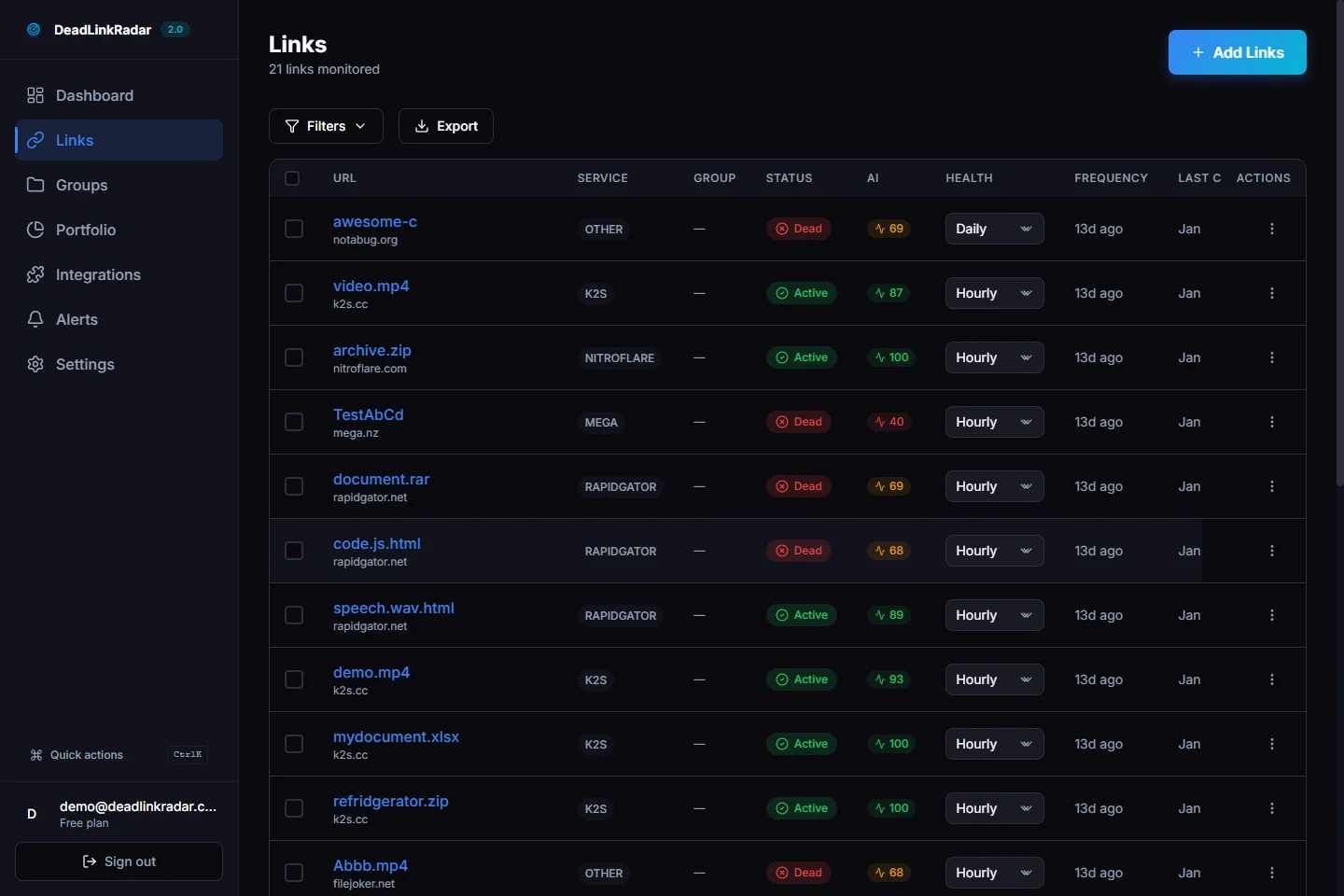
DeadLinkRadar flags dead product links in real time, so you catch them before customers do.
Bulk import takes a few minutes whether you're adding 100 links or 10,000. You can paste URLs directly, upload a CSV, or use the API to push links programmatically when you publish new products. Once imported, monitoring runs automatically — no recurring manual effort required.
The smart detection layer handles soft-404s automatically. When a product page returns a 200 status but displays "This item is no longer available," the detection system flags it as a problem. A basic status check would call it healthy. DeadLinkRadar analyzes the page content and marks it as requiring attention.
Setting Up Real-Time Alerts for Your Store
Monitoring is only useful if you find out about problems quickly enough to act. For e-commerce, the threshold should be measured in hours, not days.
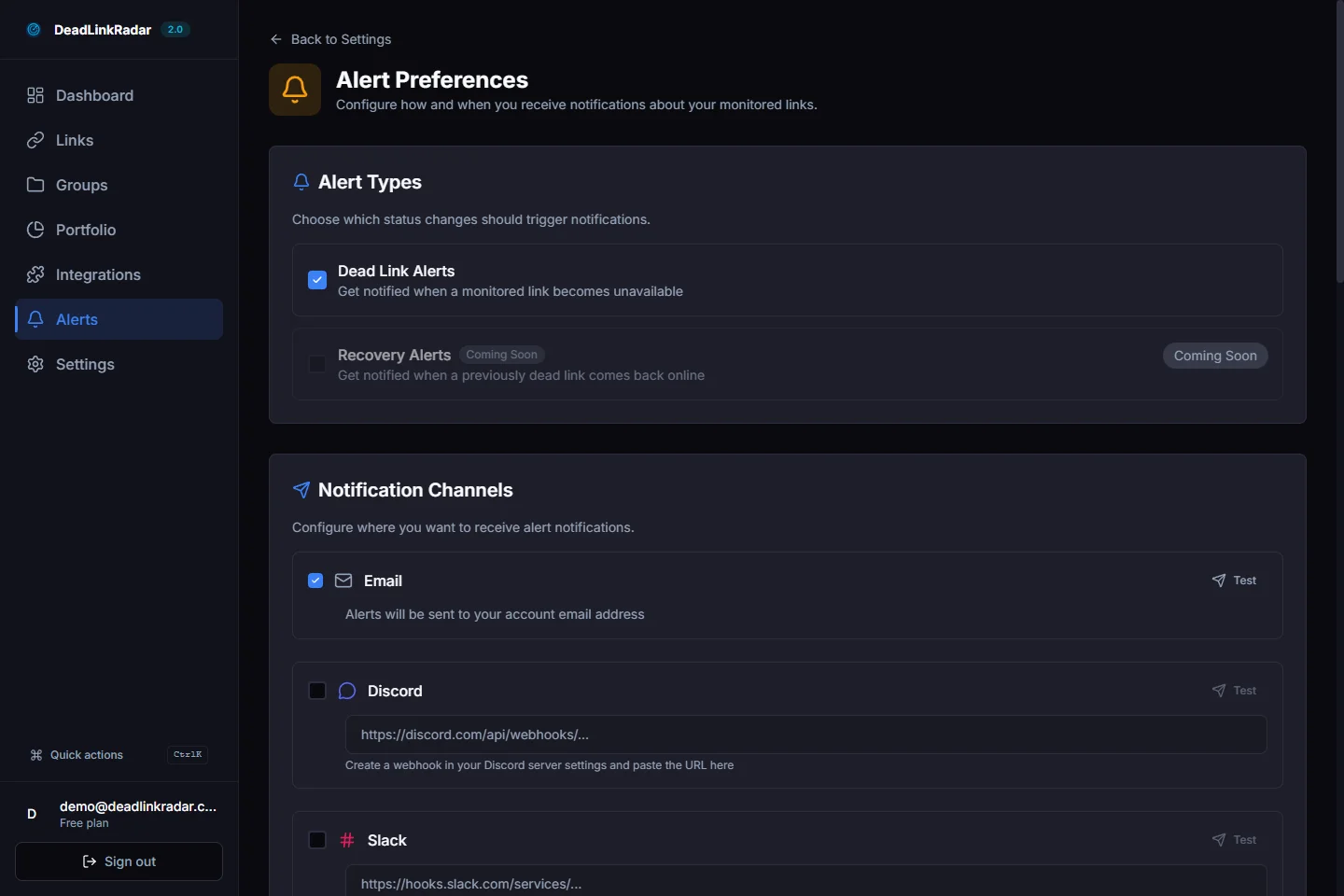
Configure alerts to get notified the moment a product link goes dead.
A practical alert configuration for e-commerce:
Email alerts — the baseline. Set these up for any link that changes from active to dead status. Email is asynchronous but ensures you don't miss anything, even if you're not watching other channels.
Slack or Discord webhook — for your highest-traffic product pages and your active promotional URLs. When a link you're actively spending ad budget on breaks, you want to know within minutes.
Weekly digest — for your full catalog. A weekly summary of new dead links, links that have recovered, and overall link health gives you a maintenance rhythm without requiring daily attention.
The goal is matching alert urgency to business impact. A broken link on a page you're running paid traffic to warrants an immediate notification. A broken supplier reference in a product description from 2023 can wait for the weekly digest.
Before You Run Your Next Promotion — The Pre-Launch Audit
The highest-leverage use of a link monitoring tool isn't ongoing background monitoring — it's the pre-launch audit before you put money behind a campaign.
Every promotional campaign involves URLs: the product page you're advertising, the collection you're featuring, the discount code landing page you built. Any of these can break between the time you plan the campaign and the time you launch it. A product page that was live last week might have been modified, a promotional URL might have a typo in the slug, a category page might have been restructured.
A pre-launch audit workflow takes about five minutes:
- Pull together all URLs involved in the campaign — product pages, landing pages, category pages, any outbound links referenced in ad copy or email content
- Import or verify them in DeadLinkRadar — if they're already being monitored, check their current status; if they're new, add them
- Confirm active status on everything before launch — don't start spending budget until every URL returns clean
- Set up an alert group for campaign URLs — so you get immediate notification if anything breaks while the campaign is live
The cost of a five-minute pre-launch check is zero. The cost of running paid traffic to a broken product page is your entire ad spend plus the customers you lost.
Start Monitoring Before the Next Link Breaks
Broken links in e-commerce are a maintenance problem with a straightforward solution: automated monitoring that runs continuously and alerts you when something breaks.
The alternative — periodic manual audits — works until your catalog grows beyond what you can check in a reasonable amount of time. By that point, broken links have likely already been costing you conversions for weeks without you knowing.
The setup is simple:
- Sign up for DeadLinkRadar — the free tier lets you monitor up to 50 links with no credit card required
- Import your highest-traffic product pages first — these are the URLs with the most revenue at stake if they break
- Set up an email alert for dead status — so you get notified immediately when something breaks
- Expand to your full catalog — add category pages, outbound links, and promotional URLs over time
Every day a broken product link stays live is a day customers are bouncing instead of buying. The fix takes less time than the revenue you're losing.
Related guides: How to Set Up Broken Link Alerts · Protect Your Affiliate Revenue With Link Monitoring · Bulk Import Links